cancel
Showing results for 
Search instead for 
Did you mean: 

Learn from the best! Meet the four finalists headed to the FINALS of the Power BI Dataviz World Championships! Register now

Reply
JeffH
Helper I
Helper I

Help

Hello, 


I have data given to me in the following format. Basically it is truckloads with mulistops on them. The data shows the load ID but has the total load cost on each stop row. I need to show a table with just the one load ID, Total Load Cost, and the stop count. 


My Data Structure
Load IDTotal Load CostDestination
12345$1,600.00Hagerstown
12345$1,600.00Frederick
12345$1,600.00Georgetown
   
Table needs to show the Following
Load IDTotal Load CostStop Count 
12345$1,600.003
1 ACCEPTED SOLUTION

Hi,

Does this work?

=SUMX(VALUES(Data[CHRNumber]),[Load Cost])


Regards,
Ashish Mathur
http://www.ashishmathur.com
https://www.linkedin.com/in/excelenthusiasts/

View solution in original post

5 REPLIES 5
Anonymous
Not applicable

Hi @JeffH 


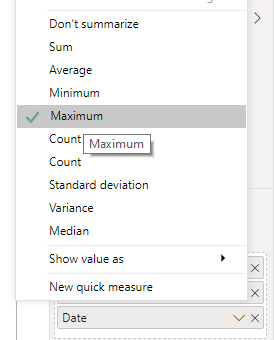
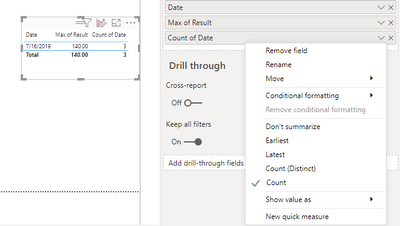
I would not go for creating a formula for this, insteasd I will do it in the Table chart itself.

here is the sample data I have.

pranit828_2-1597458787451.png

pranit828_3-1597458839056.png

pranit828_4-1597458880285.png

These simple steps you will ge the outputas you need and as in the above screenshot.


Did I resolve your issue? Mark my post as a solution!


Appreciate your Kudos, Press the thumbs up button!!


Regards,
Pranit

Ashish_Mathur
Super User
Super User

Hi,

Create a Table visual and drag Load ID to it.  Write these measures:

Load = MIN(Data[Total Load])

Count = COUNTROWS(Data)

Hope this helps.


Regards,
Ashish Mathur
http://www.ashishmathur.com
https://www.linkedin.com/in/excelenthusiasts/

Thank You, that did the trick. However I should have mentioned that I need to be able to total my load costs. Using the MIN function just shows the MIN load cost rather than the totals. Is there a way to total this? 


JeffH_0-1597460150038.png


Anonymous
Not applicable

Hi @JeffH,


That is a new ask and you should start a new thread for this, 

I believe the trick solved what you wanted in the initial post.


Hi,

Does this work?

=SUMX(VALUES(Data[CHRNumber]),[Load Cost])


Regards,
Ashish Mathur
http://www.ashishmathur.com
https://www.linkedin.com/in/excelenthusiasts/

Helpful resources

Announcements
Join our Fabric User Panel

Join our Fabric User Panel

Share feedback directly with Fabric product managers, participate in targeted research studies and influence the Fabric roadmap.

February Power BI Update Carousel

Power BI Monthly Update - February 2026

Check out the February 2026 Power BI update to learn about new features.

FabCon Atlanta 2026 carousel

FabCon Atlanta 2026

Join us at FabCon Atlanta, March 16-20, for the ultimate Fabric, Power BI, AI and SQL community-led event. Save $200 with code FABCOMM.