Don't miss your chance to take the Fabric Data Engineer (DP-600) exam for FREE! Find out how by watching the DP-600 session on-demand now through April 28th.
Learn moreJoin the FabCon + SQLCon recap series. Up next: Power BI, Real-Time Intelligence, IQ and AI, and Data Factory take center stage. All sessions are available on-demand after the live show. Register now
Hello,
I have data given to me in the following format. Basically it is truckloads with mulistops on them. The data shows the load ID but has the total load cost on each stop row. I need to show a table with just the one load ID, Total Load Cost, and the stop count.
| My Data Structure | ||
| Load ID | Total Load Cost | Destination |
| 12345 | $1,600.00 | Hagerstown |
| 12345 | $1,600.00 | Frederick |
| 12345 | $1,600.00 | Georgetown |
| Table needs to show the Following | ||
| Load ID | Total Load Cost | Stop Count |
| 12345 | $1,600.00 | 3 |
Solved! Go to Solution.
Hi,
Does this work?
=SUMX(VALUES(Data[CHRNumber]),[Load Cost])
Hi @JeffH
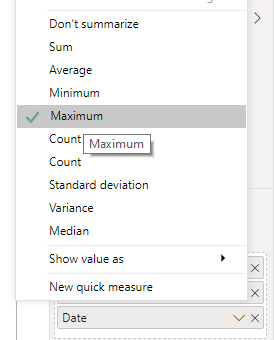
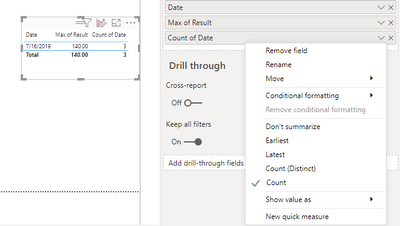
I would not go for creating a formula for this, insteasd I will do it in the Table chart itself.
here is the sample data I have.
These simple steps you will ge the outputas you need and as in the above screenshot.
Did I resolve your issue? Mark my post as a solution!
Appreciate your Kudos, Press the thumbs up button!!
Regards,
Pranit
Hi,
Create a Table visual and drag Load ID to it. Write these measures:
Load = MIN(Data[Total Load])
Count = COUNTROWS(Data)
Hope this helps.
Thank You, that did the trick. However I should have mentioned that I need to be able to total my load costs. Using the MIN function just shows the MIN load cost rather than the totals. Is there a way to total this?
Hi @JeffH,
That is a new ask and you should start a new thread for this,
I believe the trick solved what you wanted in the initial post.
Hi,
Does this work?
=SUMX(VALUES(Data[CHRNumber]),[Load Cost])
Check out the April 2026 Power BI update to learn about new features.
If you have recently started exploring Fabric, we'd love to hear how it's going. Your feedback can help with product improvements.
A new Power BI DataViz World Championship is coming this June! Don't miss out on submitting your entry.
| User | Count |
|---|---|
| 42 | |
| 37 | |
| 35 | |
| 22 | |
| 15 |
| User | Count |
|---|---|
| 67 | |
| 58 | |
| 29 | |
| 27 | |
| 25 |