cancel
Showing results for 
Search instead for 
Did you mean: 

July 7 - July 17 | Round 2 of the Power BI Dataviz World Championships. Don't miss your chance! Learn more

Reply
Anonymous
Not applicable

Help with something super simple

I am just learning, but want to create year over calculations.


Data looks just like this

Model           Year            Value

black              2017            5

blue                2016            8


My desired end state is this:

Model          2016                2017          Variance          Varaince %

Black             500                  200            -300                 -60&


I can make matrix and charts, but I want to want to create a measures that will allow me to calcuate the variance and varinace percent.


I can do a sum, and create a measure for total year sales, but I cant seem to figure out to make it so it ONLY sums if the year is 2016 or 2017.  In excel, i would use a sumif, but I cant see to find it here.  How do I essentially make a sumif cheat or is that the wrong way to go?

1 ACCEPTED SOLUTION

Hi @Anonymous,


For example in excel, it is a simple =SUMIF(B:B,"2017",D:D).  Give me the sum of column D, but only if Column b contains the data for 2017.

The formula below to create a measure is for your reference. Smiley Happy

Sales 2017 = CALCULATE(SUM('Table1'[Value]),FILTER('Table1','Table1'[Year]=2017))

Note: You'll need to replace 'Table1' with your real table name.


Regards

View solution in original post

5 REPLIES 5
Zubair_Muhammad
Community Champion
Community Champion

@Anonymous


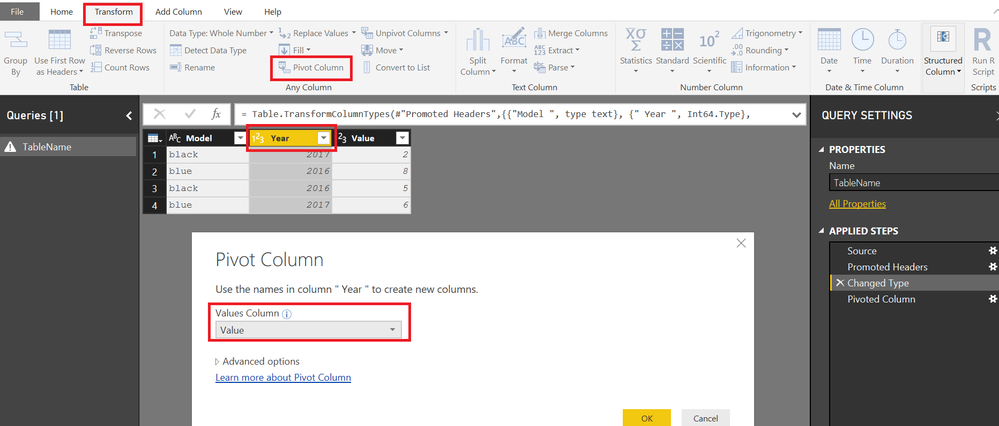
Just Pivot your YEAR column using Value column as VALUES

Then you can add the VARIANCE and VAR% columns easily

You can unpivot back as well


9003.png


You will get


9004.png

Anonymous
Not applicable

I dont understand how that works.

I am assuming I have to:

create a measure that calculates the total sales for 2016,  I cant get it to only sum the sales of 2016.

same thing for 2017. 


The i can create the varaince.

I dont understand how to do the steps above.

@Anonymous


This is done through QUERY Editor or Power Query


Right click the TABLE and select Edit Query


Anonymous
Not applicable

That is not helpful at all.  Can anyone please show me how to write a dax forumal that sums up a column, but only if another column contains a certain data point.  For example in excel, it is a simple =SUMIF(B:B,"2017",D:D).  Give me the sum of column D, but only if Column b contains the data for 2017.

Hi @Anonymous,


For example in excel, it is a simple =SUMIF(B:B,"2017",D:D).  Give me the sum of column D, but only if Column b contains the data for 2017.

The formula below to create a measure is for your reference. Smiley Happy

Sales 2017 = CALCULATE(SUM('Table1'[Value]),FILTER('Table1','Table1'[Year]=2017))

Note: You'll need to replace 'Table1' with your real table name.


Regards

Helpful resources

Announcements
FabCon and SQLCon Barcelona 2026

FabCon & SQLCon – Barcelona 2026

Join us in Barcelona for FabCon and SQLCon, the Fabric, Power BI, SQL, and AI community event. Save €200 with code FABCMTY200.

60 days of Data Days Carousel

Data Days 2026

Join Fabric Data Days 2026: 60 days of free live/on-demand sessions, challenges, study groups, and certification opportunities.

Power BI DataViz World Championships carousel

Power BI DataViz World Championships - June 2026

A new Power BI DataViz World Championship is coming this June! Don't miss out on submitting your entry.