cancel
Showing results for 
Search instead for 
Did you mean: 

Data Days is here! Join us now for 60+ days of learning, challenges, and connection. Learn more

Reply
MD_POWER_BI
Frequent Visitor

Help with nested ifs/using switch

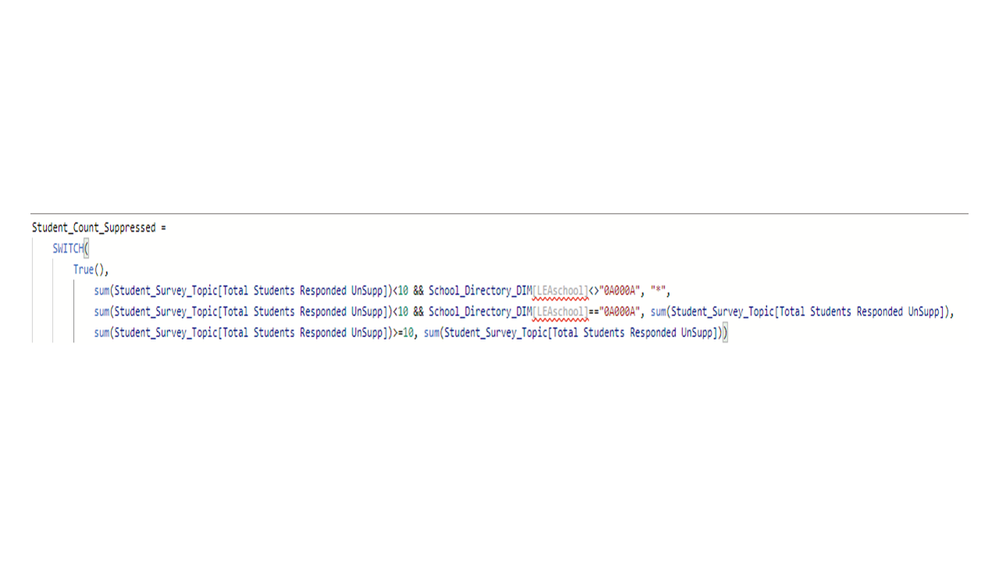
Slide1.PNGHaving difficulty with this function trying to suppress data.


I ahve to suppress student counts where n<10, except for school number "0A000A". But, Keep receiving this message:


"A single value for column 'LEAschool' ion the table 'School_Directory_DIM' cannot be determined.This can happen when a measure formula refers to a column that contains many values without specifying an aggregation such as min, max...." 

3 REPLIES 3
MD_POWER_BI
Frequent Visitor

Student_Count_Suppressed =
    SWITCH(
        True(),
            sum(Student_Survey_Topic[Total Students Responded UnSupp])<10 && SELECTEDVALUE(School_Directory_DIM[LEASchool],"0A000A"), "*",
            sum(Student_Survey_Topic[Total Students Responded UnSupp])<10 && SELECTEDVALUE(School_Directory_DIM[LEASchool],"0A000A"), sum(Student_Survey_Topic[Total Students Responded UnSupp]),
            sum(Student_Survey_Topic[Total Students Responded UnSupp])>=10, sum(Student_Survey_Topic[Total Students Responded UnSupp]))
 
This doesn't work still

Hi @MD_POWER_BI 


Can you please share a mockup data or sample of your PBIX file. You can use a onedrive, google drive, we transfer or similar link to upload your files.

If the information is sensitive please share it trough private message.


Regards

Miguel Félix


Did I answer your question? Mark my post as a solution!

Proud to be a Super User!

Check out my blog: Power BI em Português


MFelix
Super User
Super User

Hi @MD_POWER_BI ,


In measure you need to use aggregated values or table functions in this case you need to wrap the School_Directory_DIM in a SELECTEDVALUE or a DISTINCT. that way you are abble to get the expected result.


Regards

Miguel Félix


Did I answer your question? Mark my post as a solution!

Proud to be a Super User!

Check out my blog: Power BI em Português


Helpful resources

Announcements
Fabric Data Days is here Carousel

Fabric Data Days 2026

Don't miss out on Data Days, June 15 through August 7. Learn Fabric, Power BI, SQL, AI and more.

May Power BI Update Carousel

Power BI Monthly Update - May 2026

Check out the May 2026 Power BI update to learn about new features.

Power BI DataViz World Championships carousel

Power BI DataViz World Championships - June 2026

A new Power BI DataViz World Championship is coming this June! Don't miss out on submitting your entry.