cancel
Showing results for 
Search instead for 
Did you mean: 

The Power BI Data Visualization World Championships is back! It's time to submit your entry. Live now!

Reply
Pricey79
Helper V
Helper V

Help with multiple conditional formatting please

Hello everyone. I was hoping someone could help please.


I have 4 columns in a table, each column is a separate field from the same query.

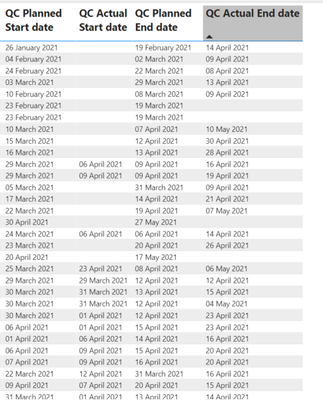
The columns as per the picture below, are QC Planned Start Date, Actual Start Date, Planned End Date and Actual End Date

Pricey79_0-1620913149186.png

How could I get it to show red or green depending on if the actual is before, or on the planned date please?

So for example:

Planned End is the 19th and Actual End is 21st, then red

Planned End is the 10th , Actual end 9th , then green


So two different formats, one for planned start and planned end, and one for actual start and actual end please.

Hope that makes sense.


Thank You in advance.

2 ACCEPTED SOLUTIONS
HashamNiaz
Solution Sage
Solution Sage

Hi !

You can create a column using following DAX to calculate if Planned End Date >= Actual End Date, you can do similar for Start date as well.


Planned End Date High = IF(Table[QC Planned End Date] >= Table[QC Actual End Date], 1, 0)


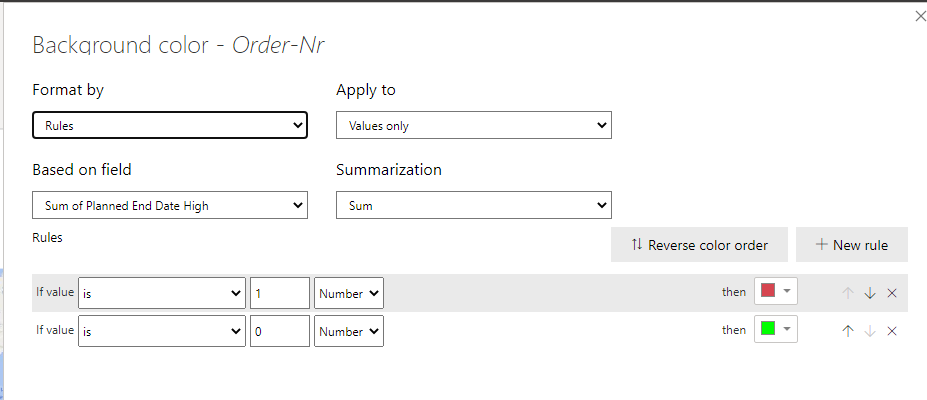
Now you can use this field in conditional formating, go to Format -> Conditional Formatting -> Background color -> On;


Colors4Colors4


You can adjust the Red & Green color based on your requirement.


Regards,

Hasham


View solution in original post

@HashamNiaz 


Works perfectly. Thank you so much

View solution in original post

2 REPLIES 2
HashamNiaz
Solution Sage
Solution Sage

Hi !

You can create a column using following DAX to calculate if Planned End Date >= Actual End Date, you can do similar for Start date as well.


Planned End Date High = IF(Table[QC Planned End Date] >= Table[QC Actual End Date], 1, 0)


Now you can use this field in conditional formating, go to Format -> Conditional Formatting -> Background color -> On;


Colors4Colors4


You can adjust the Red & Green color based on your requirement.


Regards,

Hasham


@HashamNiaz 


Works perfectly. Thank you so much

Helpful resources

Announcements
December 2025 Power BI Update Carousel

Power BI Monthly Update - December 2025

Check out the December 2025 Power BI Holiday Recap!

FabCon Atlanta 2026 carousel

FabCon Atlanta 2026

Join us at FabCon Atlanta, March 16-20, for the ultimate Fabric, Power BI, AI and SQL community-led event. Save $200 with code FABCOMM.