This time we’re going bigger than ever. Fabric, Power BI, SQL, AI and more. We're covering it all. You won't want to miss it.
Learn moreLevel up your Power BI skills this month - build one visual each week and tell better stories with data! Get started
Folks, need a help. I receive from a system the following table:
| Engagement ID | Valeu USD | Status |
| 12345 | 100 | Active |
| 12345 | 200 | Active |
| 12345 | -400 | Active |
| 12345 | 600 | Active |
| 12345 | 200 | Active |
I need to transform it in something like this in a easy way using PBI
| Engagement ID | Valeu USD | Status |
| 12345 | 700 | Active |
I´ve been strugling to work with this data and I believe these duplicates fields are the reason. Any help?
Solved! Go to Solution.
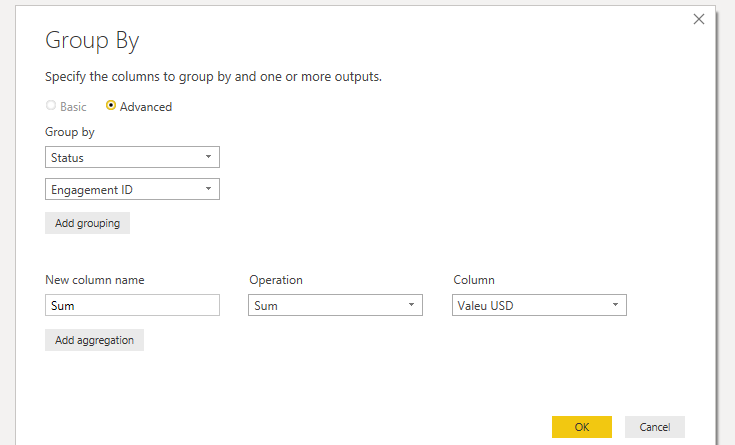
You can use group by in the edit queries, then advance and add multiple column(Screenshot below)
Hey @Anonymous
You can use the following DAX expression once the data has been imported into PBI:Consolidated Table =
SUMMARIZE(
EngagementID, EngagementID[Status],
EngagementID[Engagement ID],
"Value USD", SUM(EngagementID[Value USD])
)
Click HERE to access my PBIX file if needed.
You can use group by in the edit queries, then advance and add multiple column(Screenshot below)
I believe this can be achieved using Group By on power query.
let
Source = Table.FromRows(Json.Document(Binary.Decompress(Binary.FromText("i45WMjQyNjFV0lEyNDAAko7JJZllqUqxOggJI1wSuia4ZMyIMysWAA==", BinaryEncoding.Base64), Compression.Deflate)), let _t = ((type text) meta [Serialized.Text = true]) in type table [#"Engagement ID" = _t, #"Valeu USD" = _t, Status = _t]),
#"Changed Type" = Table.TransformColumnTypes(Source,{{"Engagement ID", Int64.Type}, {"Valeu USD", Int64.Type}, {"Status", type text}}),
#"Grouped Rows" = Table.Group(#"Changed Type", {"Engagement ID", "Status"}, {{"Value USD", each List.Sum([Valeu USD]), type number}})
in
#"Grouped Rows"
Check out the April 2026 Power BI update to learn about new features.
Sign up to receive a private message when registration opens and key events begin.
If you have recently started exploring Fabric, we'd love to hear how it's going. Your feedback can help with product improvements.
| User | Count |
|---|---|
| 36 | |
| 29 | |
| 29 | |
| 21 | |
| 18 |
| User | Count |
|---|---|
| 69 | |
| 39 | |
| 33 | |
| 24 | |
| 23 |