Hello,
I am trying to calculate each employees percentage of a full-time employee they are working. By employee, by month, I pull their actual hours worked vs what full-time hours are for that type of employee, and divide to find the percentage of Full-time they are.
For example, I have an Anesthetist that worked total 60 hours in April, based off of 2 paychecks. A full-time Anesthetist should work 80 hours per paycheck, times 2 paychecks, 160 hours. So 60/160, this person is .375 Full time employee
Actual hours is given - Hours paid on Result
Expected Hours per paycheck:
Expected Hours Per Pay Period = IF('Per Diem Pay Slips'[Job Family]="CL-Anesthetist", 80, IF('Per Diem Pay Slips'[Job Family]="CL-Anesthesiologist", 100, 0))
Count of Paychecks: Check Count = DISTINCTCOUNT('Per Diem Pay Slips'[Check Date])
Expected Hours Total: Expected Hours Total = CALCULATE(MIN('Per Diem Pay Slips'[Expected Hours Per Pay Period]) * [Check Count])
FTE Status = CALCULATE(DIVIDE(SUM('Per Diem Pay Slips'[Hours Paid on Result]), [Expected Hours Total]))
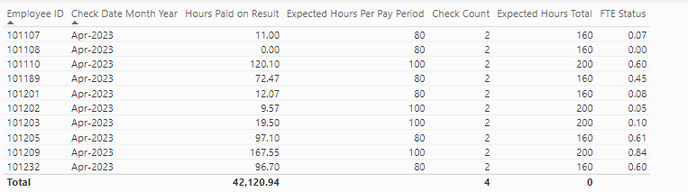
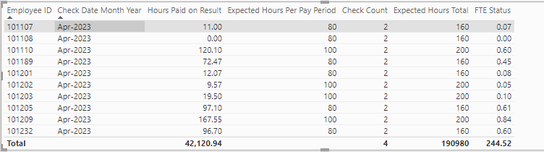
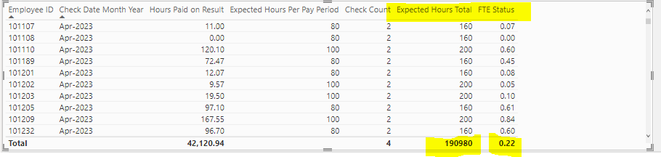
This works on an employee level. But if I need to see totals, total FTE Status for everybody, I get 0. See totals at bottom of columns, Expected Hours Total is not summing? I don't know how to revise my measures.