cancel
Showing results for 
Search instead for 
Did you mean: 

The Power BI Data Visualization World Championships is back! Get ahead of the game and start preparing now! Learn more

Reply
aashton
Helper V
Helper V

Help with measure - Actual hours worked vs required hours

Hello,

I am trying to calculate each employees percentage of a full-time employee they are working.  By employee, by month, I pull their actual hours worked vs what full-time hours are for that type of employee, and divide to find the percentage of Full-time they are.


For example, I have an Anesthetist that worked total 60 hours in April, based off of 2 paychecks.  A full-time Anesthetist should work 80 hours per paycheck, times 2 paychecks, 160 hours.  So 60/160, this person is .375 Full time employee


Actual hours is given - Hours paid on Result

Expected Hours per paycheck:  

Expected Hours Per Pay Period = IF('Per Diem Pay Slips'[Job Family]="CL-Anesthetist", 80, IF('Per Diem Pay Slips'[Job Family]="CL-Anesthesiologist", 100, 0))
 
Count of Paychecks:  
Check Count = DISTINCTCOUNT('Per Diem Pay Slips'[Check Date])
 
Expected Hours Total:  
Expected Hours Total = CALCULATE(MIN('Per Diem Pay Slips'[Expected Hours Per Pay Period]) * [Check Count])
 
FTE Status = CALCULATE(DIVIDE(SUM('Per Diem Pay Slips'[Hours Paid on Result]), [Expected Hours Total]))
 
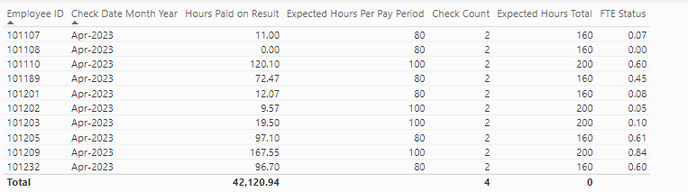
This works on an employee level.  But if I need to see totals, total FTE Status for everybody, I get 0.  See totals at bottom of columns, Expected Hours Total is not summing?  I don't know how to revise my measures.
 
aashton_0-1684940439472.png


1 ACCEPTED SOLUTION

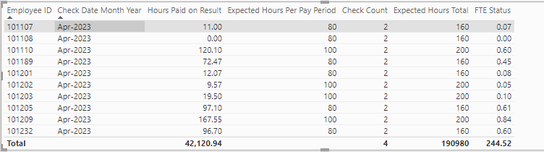
So, it looked like it was doubling or tripling the FTE Status by Employee (multiplying by number of checks):

aashton_0-1684946625922.png


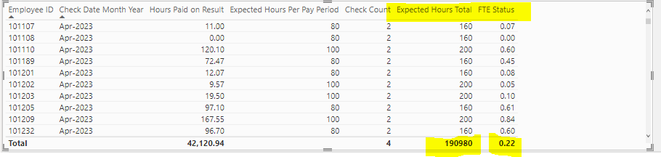
So I took Check Date out of the formula and it looks like it's working now:


FTE Status = SUMX (
    SUMMARIZE (
        'Per Diem Pay Slips',
        'Per Diem Pay Slips'[Employee ID]
    ),
    CALCULATE (
        DIVIDE (
            SUM ( 'Per Diem Pay Slips'[Hours Paid on Result] ),
            [Expected Hours Total]
        )
    )
)
 
aashton_1-1684946697736.png


View solution in original post

4 REPLIES 4
johnt75
Super User
Super User

You need to iterate over a summary table using the same columns as in the table visual, e.g.

Expected Hours Total =
SUMX (
    SUMMARIZE (
        'Per Diem Pay Slips',
        'Per Diem Pay Slips'[Employee ID],
        'Per Diem Pay Slips'[Check date]
    ),
    CALCULATE (
        MIN ( 'Per Diem Pay Slips'[Expected Hours Per Pay Period] ) * [Check Count]
    )
)

Wow, thank you so much, that worked.  But now the FTE Status is not summing, do I have to do something similar?


FTE Status = CALCULATE(DIVIDE(SUM('Per Diem Pay Slips'[Hours Paid on Result]), [Expected Hours Total]))
 
aashton_0-1684944310517.png


Yes, its the same pattern

FTE Status =
SUMX (
    SUMMARIZE (
        'Per Diem Pay Slips',
        'Per Diem Pay Slips'[Employee ID],
        'Per Diem Pay Slips'[Check date]
    ),
    CALCULATE (
        DIVIDE (
            SUM ( 'Per Diem Pay Slips'[Hours Paid on Result] ),
            [Expected Hours Total]
        )
    )
)

So, it looked like it was doubling or tripling the FTE Status by Employee (multiplying by number of checks):

aashton_0-1684946625922.png


So I took Check Date out of the formula and it looks like it's working now:


FTE Status = SUMX (
    SUMMARIZE (
        'Per Diem Pay Slips',
        'Per Diem Pay Slips'[Employee ID]
    ),
    CALCULATE (
        DIVIDE (
            SUM ( 'Per Diem Pay Slips'[Hours Paid on Result] ),
            [Expected Hours Total]
        )
    )
)
 
aashton_1-1684946697736.png


Helpful resources

Announcements
Power BI DataViz World Championships

Power BI Dataviz World Championships

The Power BI Data Visualization World Championships is back! Get ahead of the game and start preparing now!

November Power BI Update Carousel

Power BI Monthly Update - November 2025

Check out the November 2025 Power BI update to learn about new features.

FabCon Atlanta 2026 carousel

FabCon Atlanta 2026

Join us at FabCon Atlanta, March 16-20, for the ultimate Fabric, Power BI, AI and SQL community-led event. Save $200 with code FABCOMM.