cancel
Showing results for 
Search instead for 
Did you mean: 

Learn from the best! Meet the four finalists headed to the FINALS of the Power BI Dataviz World Championships! Register now

Reply
skitovich
Helper I
Helper I

Help with graphing

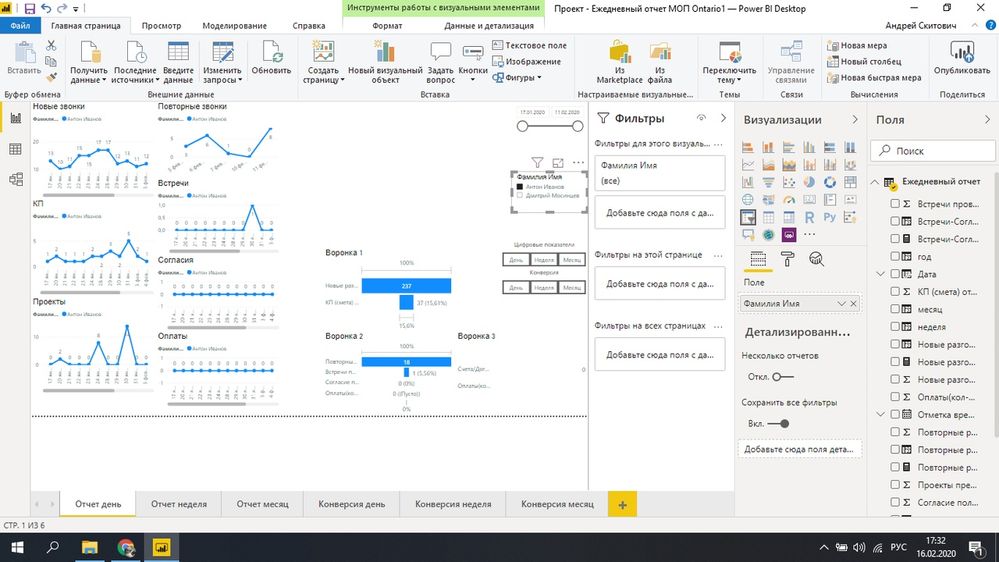
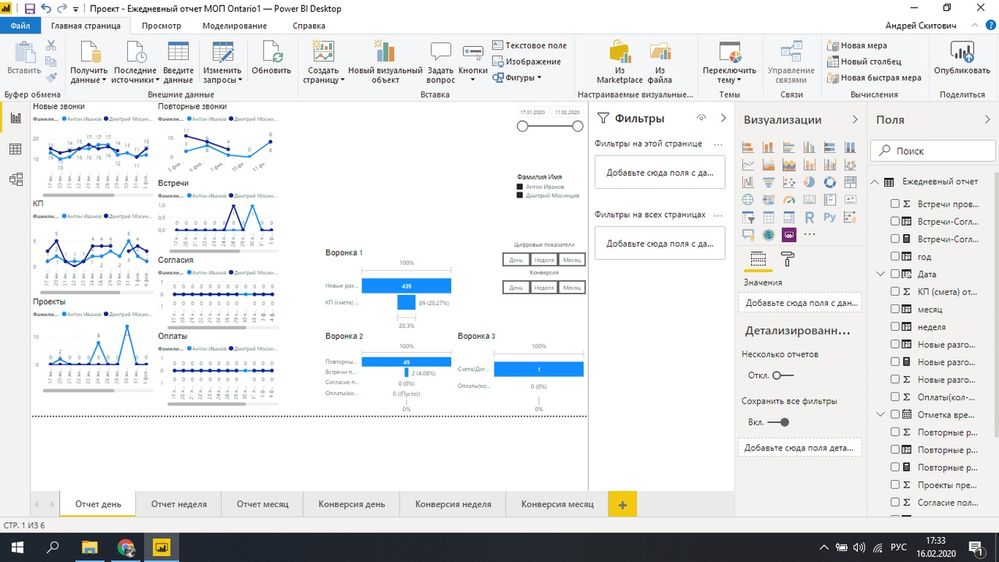
Good afternoon. I would be very grateful if you help with one question. In general, there are graphs shown in the first figure. When choosing a manager, only the selected manager is shown on the slice. When choosing two managers (Fig. 2), their comparison is shown. The question is this. How to make sure that their sum is displayed, that is, one line when no manager on the slice is selected. The slice is highlighted in the photo. I will be very grateful. I rack my brains for a long time.1.jpg2.jpg3.png

1 ACCEPTED SOLUTION
Anonymous
Not applicable

Hi,


After trying some things i came up with a solution, I don't know if it's the best possible solution, but it seems to work for me.


First i added a new custom column to your existing table with managers, with all values being "all"

ifnotfiltered = "all"

managertable.png


Then I created a new table, with all the distinct managers and an extra row for "all": 

filtertable = UNION(CALCULATETABLE(DISTINCT('Table'[manager])); ROW("manager"; "all"))

 filtertable.PNG

Then in the model window i created two relationships:

 - 'filtertable'[manager] > 'Table'[Manager] 

 - 'filtertable'[manager] > 'Table'[ifnotfiltered]
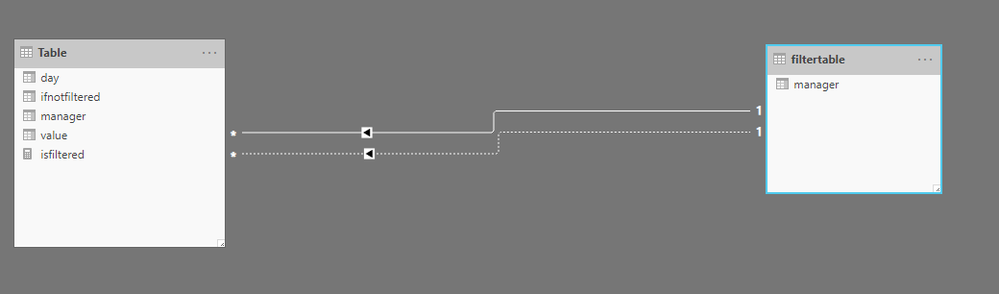
managermodel.PNG

Then create a measure that checks if the manager is filtered or not, if there is a filter we use the regular relationship, else we use the second relationship where the manager is "all"

isfiltered = if(ISFILTERED('Table'[manager]); CALCULATE(SUM('Table'[value]) ; USERELATIONSHIP('Table'[manager]; filtertable[manager])) ;CALCULATE( SUM('Table'[value]); USERELATIONSHIP('Table'[ifnotfiltered]; filtertable[manager])))


Use this measure as the Values of your charts. & it should be working.
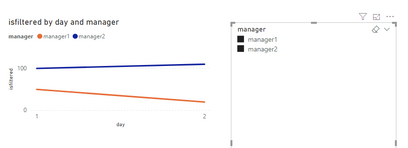
graphfiltered.PNGgraphnotfiltered.PNG

note: Due to my regional settings I use ' ; ' instead of ' , ' so maybe you need to change the semicolons to comma's in your measures


View solution in original post

3 REPLIES 3
Anonymous
Not applicable

Hi,


After trying some things i came up with a solution, I don't know if it's the best possible solution, but it seems to work for me.


First i added a new custom column to your existing table with managers, with all values being "all"

ifnotfiltered = "all"

managertable.png


Then I created a new table, with all the distinct managers and an extra row for "all": 

filtertable = UNION(CALCULATETABLE(DISTINCT('Table'[manager])); ROW("manager"; "all"))

 filtertable.PNG

Then in the model window i created two relationships:

 - 'filtertable'[manager] > 'Table'[Manager] 

 - 'filtertable'[manager] > 'Table'[ifnotfiltered]

managermodel.PNG

Then create a measure that checks if the manager is filtered or not, if there is a filter we use the regular relationship, else we use the second relationship where the manager is "all"

isfiltered = if(ISFILTERED('Table'[manager]); CALCULATE(SUM('Table'[value]) ; USERELATIONSHIP('Table'[manager]; filtertable[manager])) ;CALCULATE( SUM('Table'[value]); USERELATIONSHIP('Table'[ifnotfiltered]; filtertable[manager])))


Use this measure as the Values of your charts. & it should be working.
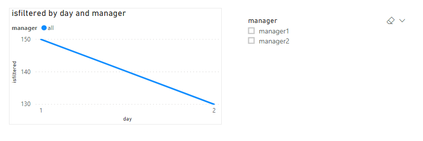
graphfiltered.PNGgraphnotfiltered.PNG

note: Due to my regional settings I use ' ; ' instead of ' , ' so maybe you need to change the semicolons to comma's in your measures


Thanks. I will try and be sure to give feedback

Doesn't work. Send you a private message

Helpful resources

Announcements
Join our Fabric User Panel

Join our Fabric User Panel

Share feedback directly with Fabric product managers, participate in targeted research studies and influence the Fabric roadmap.

February Power BI Update Carousel

Power BI Monthly Update - February 2026

Check out the February 2026 Power BI update to learn about new features.

FabCon Atlanta 2026 carousel

FabCon Atlanta 2026

Join us at FabCon Atlanta, March 16-20, for the ultimate Fabric, Power BI, AI and SQL community-led event. Save $200 with code FABCOMM.