cancel
Showing results for 
Search instead for 
Did you mean: 

Vote for your favorite vizzies from the Power BI Dataviz World Championship submissions. Vote now!

Reply
adoalan
Helper III
Helper III

Help with formula

Hi All,


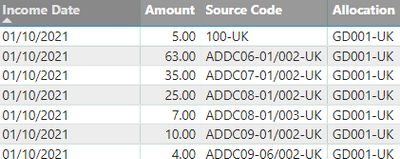
I need some help in removing -UK from both columns Source Code and Allocation

and also everything was is after / in the Source Code


adoalan_0-1680603330732.png


Any help please?


Thanks

4 REPLIES 4
DOLEARY85
Resident Rockstar
Resident Rockstar

Hi,


you can do this in power query, just right click the columns, select replace values type -uk in the first and leave the second blank

@DOLEARY85  I can't, wont let me if I'm querrieng the data from the database. To use Power Query I need to import the data and will take ages.


Ah okay, 


for the -uk part you could create a column in report view:


Column = SUBSTITUTE('Table (2)'[Column1],"-uk","")

For the part after the /  you could use the search function to count the starting character using wildcards in the search e.g 

SEARCH("???-uk",'Table (2)'[Source Code], 1, 0)
 
then use a Left function to get the left value of the string up to 1 character before the start:
 
full column: 
left('Table (2)'[Source Code],SEARCH("???-uk",'Table (2)'[Source Code], 1, 0)-1 )

Helpful resources

Announcements
Sticker Challenge 2026 Carousel

Join our Community Sticker Challenge 2026

If you love stickers, then you will definitely want to check out our Community Sticker Challenge!

January Power BI Update Carousel

Power BI Monthly Update - January 2026

Check out the January 2026 Power BI update to learn about new features.

FabCon Atlanta 2026 carousel

FabCon Atlanta 2026

Join us at FabCon Atlanta, March 16-20, for the ultimate Fabric, Power BI, AI and SQL community-led event. Save $200 with code FABCOMM.