cancel
Showing results for 
Search instead for 
Did you mean: 

July 28 - August 9 | Final Round of the Power BI Dataviz World Championships. This is your chance. Learn more

Reply
AshPower
Frequent Visitor

Help with display chart

My table have following column Datetime/Device/TestName/Pass/Fail

Note: If test passed at specific Datetime Pass value is 1 and Fail is 0.


I am looking to diaply the pass and fail value for the device and test on a chart with datetime (time to be specific)

In Datetime column is time stamp is imp. as user want to see at what time the test fail.

In value I am putting columns Pass and fail as sum.

I am not able to figure out a chart to display this. Following is what I could come up with but there is drill up/drill down which is breaking up the chart. Please suggest.

passfail.png


6 REPLIES 6
MFelix
Super User
Super User

Hi @AshPower,


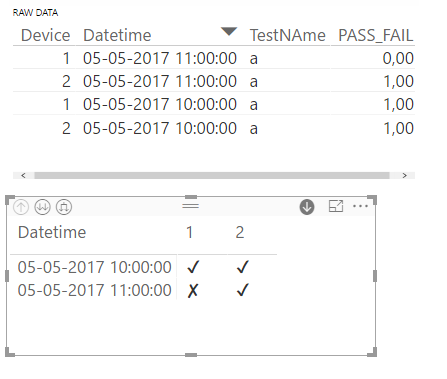
I made a small table with your information, based on that I have made two things first of all unpivot the pass and fail to a single column (name - Value) then added a measure below:


PASS/FAIL = 
IF(
    VALUES(Table1[PASS_FAIL])=1; 
        UNICHAR(9635); 
        UNICHAR(9634)
) 
& REPT(" "; 5)

Reference for this formula: https://blog.crossjoin.co.uk/2017/04/11/the-dax-unichar-function-and-how-to-use-it-in-measures-for-d...


Grabing this result I got this table don't know if it serves what you need but you can see clearly where the test gone ok or not.


PASS_FAIL.png


You can check the UNICHAR codes to use in: http://www.rapidtables.com/code/text/unicode-characters.htm (use the HTML code)


Regards,

MFelix


Regards

Miguel Félix


Did I answer your question? Mark my post as a solution!

Proud to be a Super User!

Check out my blog: Power BI em Português


Thankk you!

I tried and got this error

Failed to resolve name 'UNICHAR'. It is not a valid table, variable, or function name.


Did you find a solution? I am having the same error.

Don't know if the question.is relsted with this but try to change the dot-comma by comma cannot repest your error on the computer right now.

MFelix

Regards

Miguel Félix


Did I answer your question? Mark my post as a solution!

Proud to be a Super User!

Check out my blog: Power BI em Português


I am using this

ValFail = IF(
VALUES(ResultLDR[Result])= "Fail",
UNICHAR(9635),
UNICHAR(9634)
                 )
& REPT(" ", 5)

Try to use this one:


PASS/FAIL = 
IF(
    FIRSTNONBLANK(Table1[Pass_Fail],"Fail")="Fail", 
        UNICHAR(9634), 
        UNICHAR(9635)
) 
& REPT(" ", 5)

Regards,

MFelix


Regards

Miguel Félix


Did I answer your question? Mark my post as a solution!

Proud to be a Super User!

Check out my blog: Power BI em Português


Helpful resources

Announcements
Fabric Community Sticker Design Challenge Barcelona Carousel

Fabric Community Sticker Challenge - Barcelona 2026

If you love stickers, then you will definitely want to check out our community sticker challenge, Barcelona edition!

July Power BI Update Carousel

Power BI Monthly Update - July 2026

Check out the July 2026 Power BI update to learn about new features.

Power BI DataViz World Championships carousel

Power BI DataViz World Championships - June 2026

A new Power BI DataViz World Championship is coming this June! Don't miss out on submitting your entry.

Top Solution Authors