Get certified for free when you join Fabric Data Days 2026 and dive into Fabric, Power BI, SQL, AI, and other essential data skills.
Join nowJuly 7 - July 17 | Round 2 of the Power BI Dataviz World Championships. Don't miss your chance! Learn more
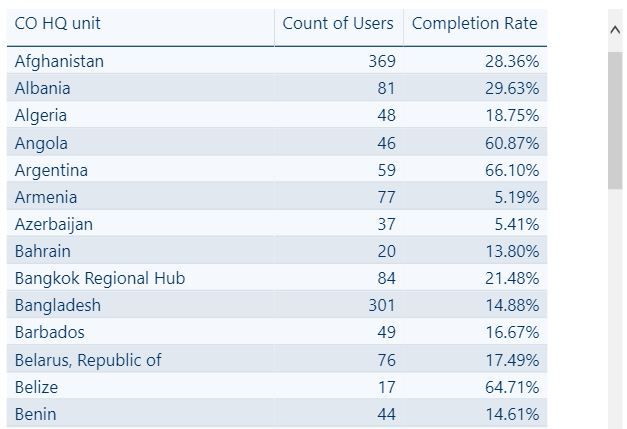
Hi! I have a table with three columns: Country Office, User, and Completion Status (1 or 0). I also have the measure "Completion Rate", which just takes the average of the Completion Status column and returns the overall completion rate for my users. Based on this information, I want to create a new table with three columns: Country Office, User Count (for the country office), and Completion Rate (for the country office).
In excel this would be pretty straighforward with the Countif() function, but could anyone suggest an effective way to do this in Power BI?
Below is a screenshot of the table I want:
Solved! Go to Solution.
You can try to use GROUPBY function to get this kind of summary information.
NewTableName = GROUPBY('ExistingTableName','ExistingTableName'[Country],"Count of Users",COUNTX(CURRENTGROUP(),'ExistingTableName'[Users]),"Completion Rate", AVERAGEX(CURRENTGROUP(),SUM'ExistingTableName'[Completion Status]/COUNT'ExistingTableName'[Users]))
Hi @thomasOfver,
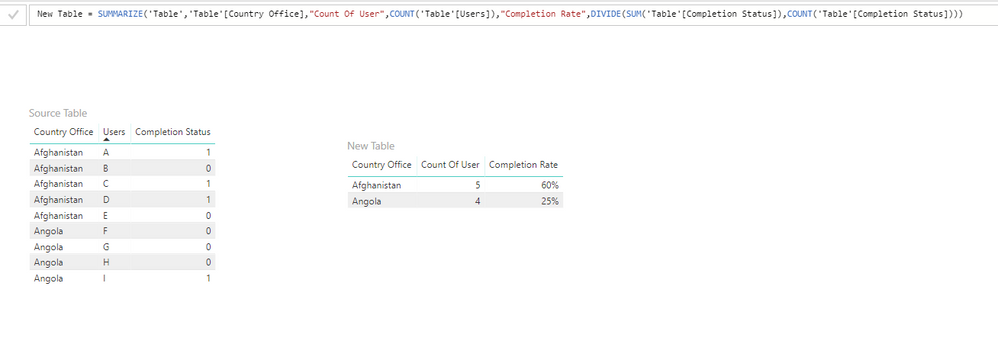
To achieve your requirement, I think you can try SUMMARIZE() function. Please refer to following sample:
New Table =
SUMMARIZE (
'Table',
'Table'[Country Office],
"Count Of User", COUNT ( 'Table'[Users] ),
"Completion Rate", DIVIDE (
SUM ( 'Table'[Completion Status] ),
COUNT ( 'Table'[Completion Status] )
)
)
Thanks,
Xi Jin.
You can try to use GROUPBY function to get this kind of summary information.
NewTableName = GROUPBY('ExistingTableName','ExistingTableName'[Country],"Count of Users",COUNTX(CURRENTGROUP(),'ExistingTableName'[Users]),"Completion Rate", AVERAGEX(CURRENTGROUP(),SUM'ExistingTableName'[Completion Status]/COUNT'ExistingTableName'[Users]))
@Anonymouswrote:You can try to use GROUPBY function to get this kind of summary information.
NewTableName = GROUPBY('ExistingTableName','ExistingTableName'[Country],"Count of Users",COUNTX(CURRENTGROUP(),'ExistingTableName'[Users]),"Completion Rate", AVERAGEX(CURRENTGROUP(),SUM'ExistingTableName'[Completion Status]/COUNT'ExistingTableName'[Users]))
This totally did the trick - thank you! 🙂
I would create the following three measures:
[# of Users] =
COUNTROWS( table )[# Complete] =
SUM ( table[Completion Status] )
[% Completion Rate] =
DIVIDE( [# Complete], [# of Users] )Then put table[Country Office] in your table visual, along with these two measures: [# of Users] and [% Completion Rate]
Join us in Barcelona for FabCon and SQLCon, the Fabric, Power BI, SQL, and AI community event. Save €200 with code FABCMTY200.
Join Fabric Data Days 2026: 60 days of free live/on-demand sessions, challenges, study groups, and certification opportunities.
| User | Count |
|---|---|
| 22 | |
| 22 | |
| 18 | |
| 16 | |
| 13 |
| User | Count |
|---|---|
| 63 | |
| 42 | |
| 40 | |
| 40 | |
| 40 |