This time we’re going bigger than ever. Fabric, Power BI, SQL, AI and more. We're covering it all. You won't want to miss it.
Learn moreGet Fabric Certified for FREE during AI Skills Fest. This week only. Secure your voucher now.
Hi! I have a table with three columns: Country Office, User, and Completion Status (1 or 0). I also have the measure "Completion Rate", which just takes the average of the Completion Status column and returns the overall completion rate for my users. Based on this information, I want to create a new table with three columns: Country Office, User Count (for the country office), and Completion Rate (for the country office).
In excel this would be pretty straighforward with the Countif() function, but could anyone suggest an effective way to do this in Power BI?
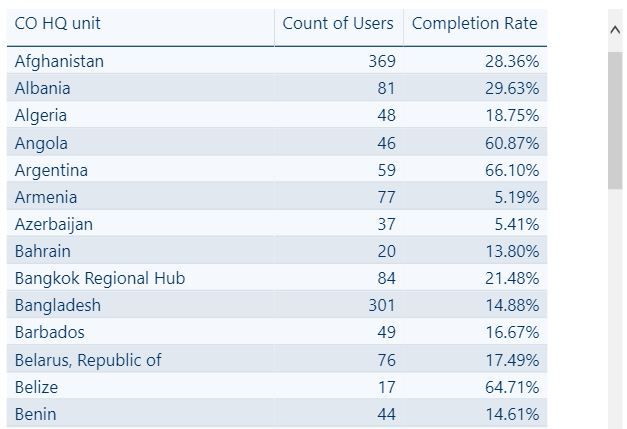
Below is a screenshot of the table I want:
Solved! Go to Solution.
You can try to use GROUPBY function to get this kind of summary information.
NewTableName = GROUPBY('ExistingTableName','ExistingTableName'[Country],"Count of Users",COUNTX(CURRENTGROUP(),'ExistingTableName'[Users]),"Completion Rate", AVERAGEX(CURRENTGROUP(),SUM'ExistingTableName'[Completion Status]/COUNT'ExistingTableName'[Users]))
Hi @thomasOfver,
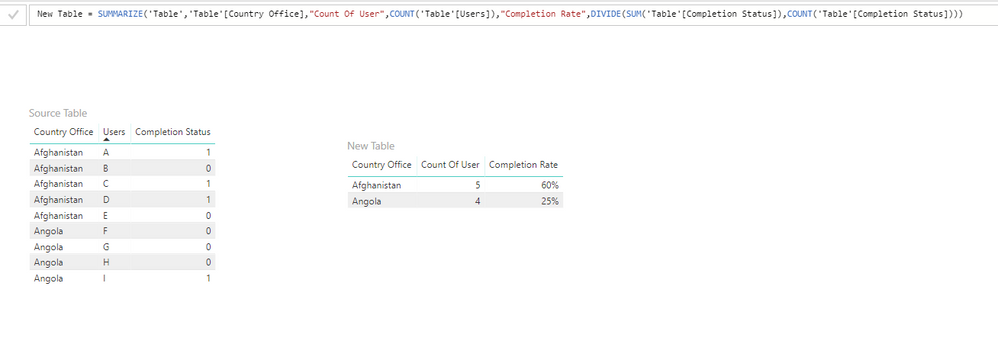
To achieve your requirement, I think you can try SUMMARIZE() function. Please refer to following sample:
New Table =
SUMMARIZE (
'Table',
'Table'[Country Office],
"Count Of User", COUNT ( 'Table'[Users] ),
"Completion Rate", DIVIDE (
SUM ( 'Table'[Completion Status] ),
COUNT ( 'Table'[Completion Status] )
)
)
Thanks,
Xi Jin.
You can try to use GROUPBY function to get this kind of summary information.
NewTableName = GROUPBY('ExistingTableName','ExistingTableName'[Country],"Count of Users",COUNTX(CURRENTGROUP(),'ExistingTableName'[Users]),"Completion Rate", AVERAGEX(CURRENTGROUP(),SUM'ExistingTableName'[Completion Status]/COUNT'ExistingTableName'[Users]))
@Anonymouswrote:You can try to use GROUPBY function to get this kind of summary information.
NewTableName = GROUPBY('ExistingTableName','ExistingTableName'[Country],"Count of Users",COUNTX(CURRENTGROUP(),'ExistingTableName'[Users]),"Completion Rate", AVERAGEX(CURRENTGROUP(),SUM'ExistingTableName'[Completion Status]/COUNT'ExistingTableName'[Users]))
This totally did the trick - thank you! 🙂
I would create the following three measures:
[# of Users] =
COUNTROWS( table )[# Complete] =
SUM ( table[Completion Status] )
[% Completion Rate] =
DIVIDE( [# Complete], [# of Users] )Then put table[Country Office] in your table visual, along with these two measures: [# of Users] and [% Completion Rate]
Check out the May 2026 Power BI update to learn about new features.
Sign up to receive a private message when registration opens and key events begin.
If you have recently started exploring Fabric, we'd love to hear how it's going. Your feedback can help with product improvements.
| User | Count |
|---|---|
| 23 | |
| 21 | |
| 21 | |
| 21 | |
| 16 |
| User | Count |
|---|---|
| 55 | |
| 53 | |
| 45 | |
| 26 | |
| 24 |