Don't miss your chance to take the Fabric Data Engineer (DP-700) exam on us!
Learn moreWe've captured the moments from FabCon & SQLCon that everyone is talking about, and we are bringing them to the community, live and on-demand. Starts on April 14th. Register now
I am new to PowerBI and am unable to create charts using data from multiple datasets. A status report is published each month, utilizing the same Identifiers, but may have new/some rows removed. I am trying to chart the previous 3 months of data on various charts (column, line, etc.). Then, each month i will receive new data and need to pull into PowerBI and add that month's info.
Dataset1 (Month 1)
| Month | Identifier | Store | Leased | Open |
| March | [unique] | [Store Name, there are 5] | [Yes/No] | [Yes/No] |
Dataset2 (Month 2)
| Month | Identifier | Store | Leased | Open |
| April | [unique] | [Store Name, there are 5] | [Yes/No] | [Yes/No] |
Dataset3 (Month 3)
| Month | Identifier | Store | Leased | Open |
| May | [unique] | [Store Name, there are 5] | [Yes/No] | [Yes/No] |
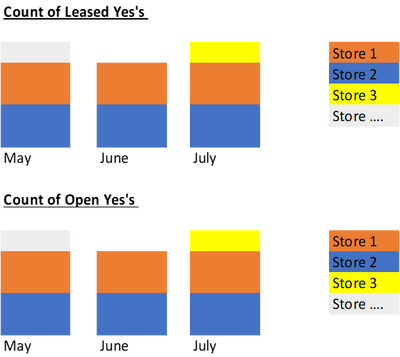
I would like the chart to look like this:
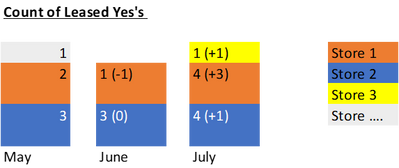
Got it! Now, do you know how i can show the total change month over month for each component? Something like this...
If you have recently started exploring Fabric, we'd love to hear how it's going. Your feedback can help with product improvements.
A new Power BI DataViz World Championship is coming this June! Don't miss out on submitting your entry.
Share feedback directly with Fabric product managers, participate in targeted research studies and influence the Fabric roadmap.
| User | Count |
|---|---|
| 56 | |
| 39 | |
| 35 | |
| 19 | |
| 17 |
| User | Count |
|---|---|
| 73 | |
| 70 | |
| 37 | |
| 35 | |
| 26 |