Join us at FabCon Atlanta from March 16 - 20, 2026, for the ultimate Fabric, Power BI, AI and SQL community-led event. Save $200 with code FABCOMM.
Register now!The Power BI Data Visualization World Championships is back! Get ahead of the game and start preparing now! Learn more
I am new to PowerBI and am unable to create charts using data from multiple datasets. A status report is published each month, utilizing the same Identifiers, but may have new/some rows removed. I am trying to chart the previous 3 months of data on various charts (column, line, etc.). Then, each month i will receive new data and need to pull into PowerBI and add that month's info.
Dataset1 (Month 1)
| Month | Identifier | Store | Leased | Open |
| March | [unique] | [Store Name, there are 5] | [Yes/No] | [Yes/No] |
Dataset2 (Month 2)
| Month | Identifier | Store | Leased | Open |
| April | [unique] | [Store Name, there are 5] | [Yes/No] | [Yes/No] |
Dataset3 (Month 3)
| Month | Identifier | Store | Leased | Open |
| May | [unique] | [Store Name, there are 5] | [Yes/No] | [Yes/No] |
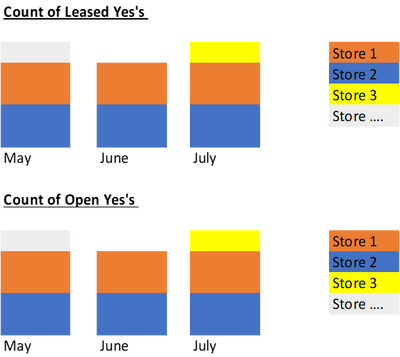
I would like the chart to look like this:
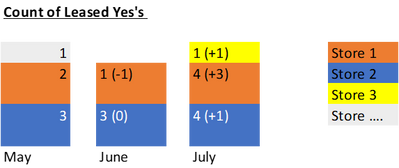
Got it! Now, do you know how i can show the total change month over month for each component? Something like this...
The Power BI Data Visualization World Championships is back! Get ahead of the game and start preparing now!
Check out the November 2025 Power BI update to learn about new features.
| User | Count |
|---|---|
| 65 | |
| 44 | |
| 40 | |
| 29 | |
| 19 |
| User | Count |
|---|---|
| 202 | |
| 130 | |
| 102 | |
| 72 | |
| 55 |