FabCon is coming to Atlanta
Join us at FabCon Atlanta from March 16 - 20, 2026, for the ultimate Fabric, Power BI, AI and SQL community-led event. Save $200 with code FABCOMM.
Register now!- Power BI forums
- Get Help with Power BI
- Desktop
- Service
- Report Server
- Power Query
- Mobile Apps
- Developer
- DAX Commands and Tips
- Custom Visuals Development Discussion
- Health and Life Sciences
- Power BI Spanish forums
- Translated Spanish Desktop
- Training and Consulting
- Instructor Led Training
- Dashboard in a Day for Women, by Women
- Galleries
- Data Stories Gallery
- Themes Gallery
- Contests Gallery
- QuickViz Gallery
- Quick Measures Gallery
- Visual Calculations Gallery
- Notebook Gallery
- Translytical Task Flow Gallery
- TMDL Gallery
- R Script Showcase
- Webinars and Video Gallery
- Ideas
- Custom Visuals Ideas (read-only)
- Issues
- Issues
- Events
- Upcoming Events
The Power BI Data Visualization World Championships is back! It's time to submit your entry. Live now!
- Power BI forums
- Forums
- Get Help with Power BI
- Desktop
- Help with calculated dates
- Subscribe to RSS Feed
- Mark Topic as New
- Mark Topic as Read
- Float this Topic for Current User
- Bookmark
- Subscribe
- Printer Friendly Page


- Mark as New
- Bookmark
- Subscribe
- Mute
- Subscribe to RSS Feed
- Permalink
- Report Inappropriate Content
Help with calculated dates
Hi guys!
I am having a calculation problem for the difference in dates between the steps of my data model.
Here's the model:
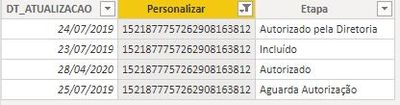
I need to calculate the difference in dates between each step, for that I made a measure that didn't work entirely.
Measure created:
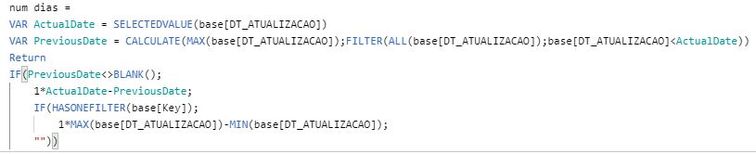
This measure works when I don't use the step in the vision:
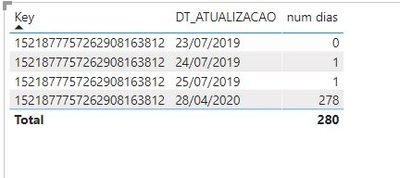
We can see above that the calculation is done correctly between the dates.
When I use the step in the table the calculation stops happening:
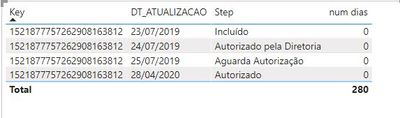
Can someone help me solve this problem?
Solved! Go to Solution.

- Mark as New
- Bookmark
- Subscribe
- Mute
- Subscribe to RSS Feed
- Permalink
- Report Inappropriate Content
you can try to create a column
Column =
VAR last=maxx(FILTER('Table','Table'[DT_atualizacao]<EARLIER('Table'[DT_atualizacao])&&'Table'[personalizar]=EARLIER('Table'[personalizar])),'Table'[DT_atualizacao])
return if(ISBLANK(last),0,'Table'[DT_atualizacao]-last)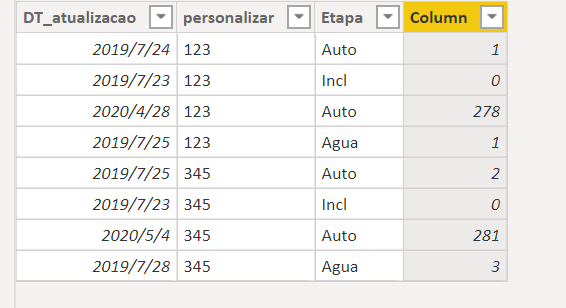
Did I answer your question? Mark my post as a solution!
Proud to be a Super User!
- Mark as New
- Bookmark
- Subscribe
- Mute
- Subscribe to RSS Feed
- Permalink
- Report Inappropriate Content
please try this
Measure =
var last=maxx(FILTER(all('Table'),'Table'[DT_atualizacao]<SELECTEDVALUE('Table'[DT_atualizacao])),'Table'[DT_atualizacao])
return if(ISFILTERED('Table'[DT_atualizacao]),if(ISBLANK(last),0,SELECTEDVALUE('Table'[DT_atualizacao])-MAXX(FILTER(all('Table'),'Table'[DT_atualizacao]=last),'Table'[DT_atualizacao])),CALCULATE(max('Table'[DT_atualizacao]),all('Table'))-CALCULATE(MIN('Table'[DT_atualizacao]),ALL('Table')))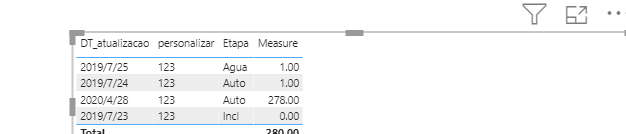
Did I answer your question? Mark my post as a solution!
Proud to be a Super User!
- Mark as New
- Bookmark
- Subscribe
- Mute
- Subscribe to RSS Feed
- Permalink
- Report Inappropriate Content
@ryan_mayu
Almost!
Now, the only thing that is still wrong is that we are calculating a difference in days for the start date of the process.
See below:
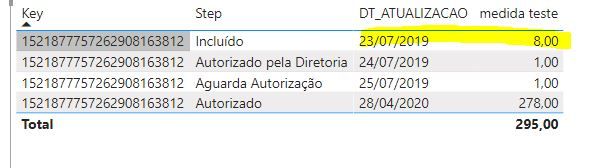
I think it would be zero.
- Mark as New
- Bookmark
- Subscribe
- Mute
- Subscribe to RSS Feed
- Permalink
- Report Inappropriate Content
Measure =
var last=maxx(FILTER(all('Table'),'Table'[DT_atualizacao]<SELECTEDVALUE('Table'[DT_atualizacao])),'Table'[DT_atualizacao])
return if(ISFILTERED('Table'[DT_atualizacao]),if(ISBLANK(last),0,SELECTEDVALUE('Table'[DT_atualizacao])-MAXX(FILTER(all('Table'),'Table'[DT_atualizacao]=last),'Table'[DT_atualizacao])),CALCULATE(max('Table'[DT_atualizacao]),all('Table'))-CALCULATE(MIN('Table'[DT_atualizacao]),ALL('Table')))
In the DAX, iI checked if it is the earliest date, if it is , then display 0. please have a try.
Did I answer your question? Mark my post as a solution!
Proud to be a Super User!
- Mark as New
- Bookmark
- Subscribe
- Mute
- Subscribe to RSS Feed
- Permalink
- Report Inappropriate Content
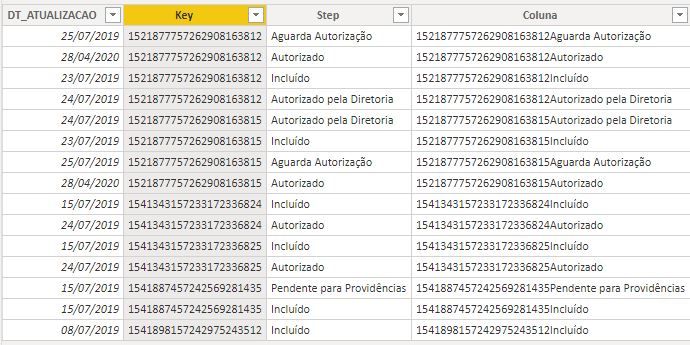
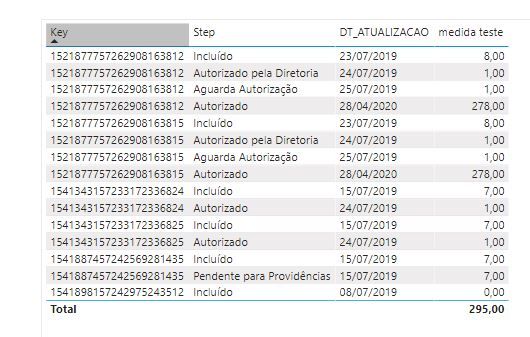
@ryan_mayu
I used your mesure, see below:
- Mark as New
- Bookmark
- Subscribe
- Mute
- Subscribe to RSS Feed
- Permalink
- Report Inappropriate Content
you can try to create a column
Column =
VAR last=maxx(FILTER('Table','Table'[DT_atualizacao]<EARLIER('Table'[DT_atualizacao])&&'Table'[personalizar]=EARLIER('Table'[personalizar])),'Table'[DT_atualizacao])
return if(ISBLANK(last),0,'Table'[DT_atualizacao]-last)
Did I answer your question? Mark my post as a solution!
Proud to be a Super User!
- Mark as New
- Bookmark
- Subscribe
- Mute
- Subscribe to RSS Feed
- Permalink
- Report Inappropriate Content
Measure =
var last=maxx(FILTER(all('Table'),'Table'[DT_atualizacao]<SELECTEDVALUE('Table'[DT_atualizacao])),'Table'[DT_atualizacao])
return if(ISFILTERED('Table'[DT_atualizacao]),if(ISBLANK(last),0,SELECTEDVALUE('Table'[DT_atualizacao])-MAXX(FILTER(all('Table'),'Table'[DT_atualizacao]=last),'Table'[DT_atualizacao])),CALCULATE(max('Table'[DT_atualizacao]),all('Table'))-CALCULATE(MIN('Table'[DT_atualizacao]),ALL('Table')))
In the DAX, iI checked if it is the earliest date, if it is , then display 0. please have a try.
Did I answer your question? Mark my post as a solution!
Proud to be a Super User!

Helpful resources

Power BI Dataviz World Championships
The Power BI Data Visualization World Championships is back! It's time to submit your entry.

Power BI Monthly Update - January 2026
Check out the January 2026 Power BI update to learn about new features.

FabCon Atlanta 2026
Join us at FabCon Atlanta, March 16-20, for the ultimate Fabric, Power BI, AI and SQL community-led event. Save $200 with code FABCOMM.

| User | Count |
|---|---|
| 60 | |
| 46 | |
| 39 | |
| 23 | |
| 23 |


| User | Count |
|---|---|
| 144 | |
| 106 | |
| 64 | |
| 38 | |
| 31 |


