- Power BI forums
- Get Help with Power BI
- Desktop
- Service
- Report Server
- Power Query
- Mobile Apps
- Developer
- DAX Commands and Tips
- Custom Visuals Development Discussion
- Health and Life Sciences
- Power BI Spanish forums
- Translated Spanish Desktop
- Training and Consulting
- Instructor Led Training
- Dashboard in a Day for Women, by Women
- Galleries
- Data Stories Gallery
- Themes Gallery
- Contests Gallery
- QuickViz Gallery
- Quick Measures Gallery
- Visual Calculations Gallery
- Notebook Gallery
- Translytical Task Flow Gallery
- TMDL Gallery
- R Script Showcase
- Webinars and Video Gallery
- Ideas
- Custom Visuals Ideas (read-only)
- Issues
- Issues
- Events
- Upcoming Events
Learn from the best! Meet the four finalists headed to the FINALS of the Power BI Dataviz World Championships! Register now
- Power BI forums
- Forums
- Get Help with Power BI
- Desktop
- Help with calculated dates
- Subscribe to RSS Feed
- Mark Topic as New
- Mark Topic as Read
- Float this Topic for Current User
- Bookmark
- Subscribe
- Printer Friendly Page


- Mark as New
- Bookmark
- Subscribe
- Mute
- Subscribe to RSS Feed
- Permalink
- Report Inappropriate Content
Help with calculated dates
Hi guys!
I am having a calculation problem for the difference in dates between the steps of my data model.
Here's the model:
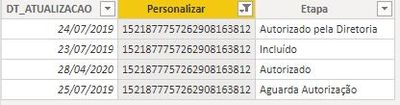
I need to calculate the difference in dates between each step, for that I made a measure that didn't work entirely.
Measure created:
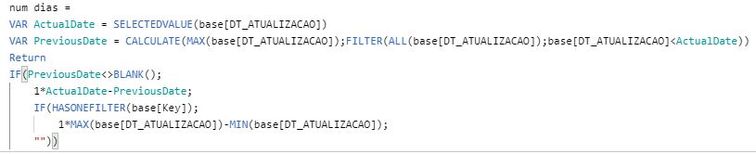
This measure works when I don't use the step in the vision:
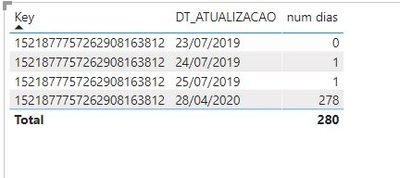
We can see above that the calculation is done correctly between the dates.
When I use the step in the table the calculation stops happening:
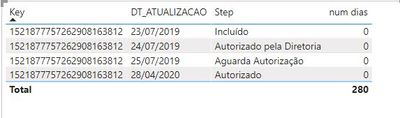
Can someone help me solve this problem?
Solved! Go to Solution.

- Mark as New
- Bookmark
- Subscribe
- Mute
- Subscribe to RSS Feed
- Permalink
- Report Inappropriate Content
you can try to create a column
Column =
VAR last=maxx(FILTER('Table','Table'[DT_atualizacao]<EARLIER('Table'[DT_atualizacao])&&'Table'[personalizar]=EARLIER('Table'[personalizar])),'Table'[DT_atualizacao])
return if(ISBLANK(last),0,'Table'[DT_atualizacao]-last)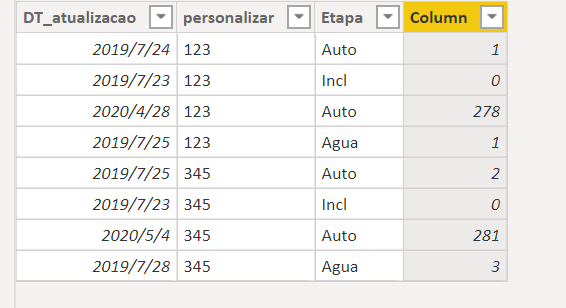
Did I answer your question? Mark my post as a solution!
Proud to be a Super User!
- Mark as New
- Bookmark
- Subscribe
- Mute
- Subscribe to RSS Feed
- Permalink
- Report Inappropriate Content
please try this
Measure =
var last=maxx(FILTER(all('Table'),'Table'[DT_atualizacao]<SELECTEDVALUE('Table'[DT_atualizacao])),'Table'[DT_atualizacao])
return if(ISFILTERED('Table'[DT_atualizacao]),if(ISBLANK(last),0,SELECTEDVALUE('Table'[DT_atualizacao])-MAXX(FILTER(all('Table'),'Table'[DT_atualizacao]=last),'Table'[DT_atualizacao])),CALCULATE(max('Table'[DT_atualizacao]),all('Table'))-CALCULATE(MIN('Table'[DT_atualizacao]),ALL('Table')))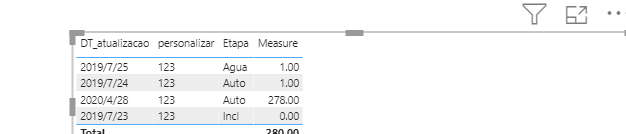
Did I answer your question? Mark my post as a solution!
Proud to be a Super User!
- Mark as New
- Bookmark
- Subscribe
- Mute
- Subscribe to RSS Feed
- Permalink
- Report Inappropriate Content
@ryan_mayu
Almost!
Now, the only thing that is still wrong is that we are calculating a difference in days for the start date of the process.
See below:
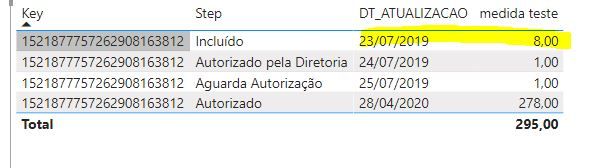
I think it would be zero.
- Mark as New
- Bookmark
- Subscribe
- Mute
- Subscribe to RSS Feed
- Permalink
- Report Inappropriate Content
Measure =
var last=maxx(FILTER(all('Table'),'Table'[DT_atualizacao]<SELECTEDVALUE('Table'[DT_atualizacao])),'Table'[DT_atualizacao])
return if(ISFILTERED('Table'[DT_atualizacao]),if(ISBLANK(last),0,SELECTEDVALUE('Table'[DT_atualizacao])-MAXX(FILTER(all('Table'),'Table'[DT_atualizacao]=last),'Table'[DT_atualizacao])),CALCULATE(max('Table'[DT_atualizacao]),all('Table'))-CALCULATE(MIN('Table'[DT_atualizacao]),ALL('Table')))
In the DAX, iI checked if it is the earliest date, if it is , then display 0. please have a try.
Did I answer your question? Mark my post as a solution!
Proud to be a Super User!
- Mark as New
- Bookmark
- Subscribe
- Mute
- Subscribe to RSS Feed
- Permalink
- Report Inappropriate Content
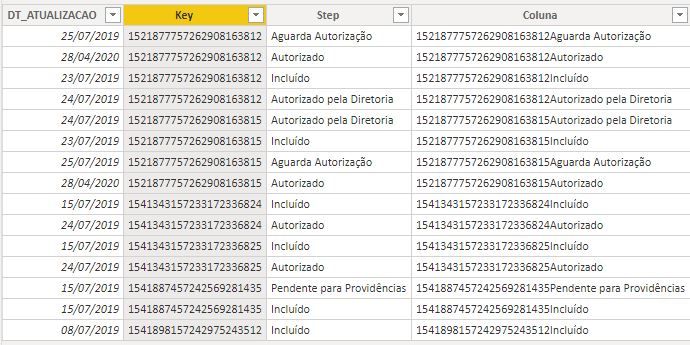
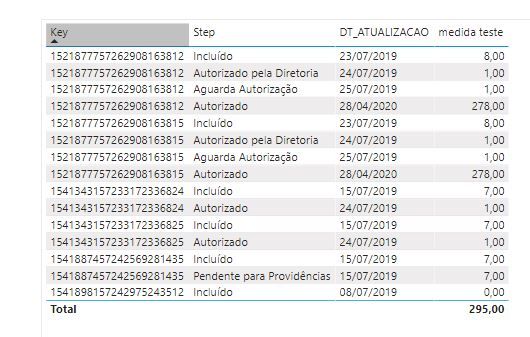
@ryan_mayu
I used your mesure, see below:
- Mark as New
- Bookmark
- Subscribe
- Mute
- Subscribe to RSS Feed
- Permalink
- Report Inappropriate Content
you can try to create a column
Column =
VAR last=maxx(FILTER('Table','Table'[DT_atualizacao]<EARLIER('Table'[DT_atualizacao])&&'Table'[personalizar]=EARLIER('Table'[personalizar])),'Table'[DT_atualizacao])
return if(ISBLANK(last),0,'Table'[DT_atualizacao]-last)
Did I answer your question? Mark my post as a solution!
Proud to be a Super User!
- Mark as New
- Bookmark
- Subscribe
- Mute
- Subscribe to RSS Feed
- Permalink
- Report Inappropriate Content
Measure =
var last=maxx(FILTER(all('Table'),'Table'[DT_atualizacao]<SELECTEDVALUE('Table'[DT_atualizacao])),'Table'[DT_atualizacao])
return if(ISFILTERED('Table'[DT_atualizacao]),if(ISBLANK(last),0,SELECTEDVALUE('Table'[DT_atualizacao])-MAXX(FILTER(all('Table'),'Table'[DT_atualizacao]=last),'Table'[DT_atualizacao])),CALCULATE(max('Table'[DT_atualizacao]),all('Table'))-CALCULATE(MIN('Table'[DT_atualizacao]),ALL('Table')))
In the DAX, iI checked if it is the earliest date, if it is , then display 0. please have a try.
Did I answer your question? Mark my post as a solution!
Proud to be a Super User!

Helpful resources

Power BI DataViz World Championships - June 2026
A new Power BI DataViz World Championship is coming this June! Don't miss out on submitting your entry.

Join our Fabric User Panel
Share feedback directly with Fabric product managers, participate in targeted research studies and influence the Fabric roadmap.

Power BI Community Update - March 2026
Check out the March 2026 Power BI update to learn about new features.

| User | Count |
|---|---|
| 50 | |
| 34 | |
| 30 | |
| 17 | |
| 16 |


| User | Count |
|---|---|
| 65 | |
| 64 | |
| 41 | |
| 27 | |
| 24 |


