Join us at FabCon Atlanta from March 16 - 20, 2026, for the ultimate Fabric, Power BI, AI and SQL community-led event. Save $200 with code FABCOMM.
Register now!The Power BI Data Visualization World Championships is back! Get ahead of the game and start preparing now! Learn more
Hello
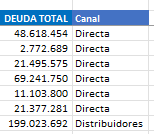
I need to help please to create a dax formula that adds the sales of my channel column:
I don't know if it's possible
of anteman
Solved! Go to Solution.
You need the following measure:
% por canal =
VAR _ALL = CALCULATE ([Measure Sum Deuda], ALL(fTable[Canal])
RETURN
DIVIDE([Measure Sum Deuda]), _ALL)
Format this measure as a % in the ribbon
then create the line chart using this measure and add fTable[Canal] as the legend
Proud to be a Super User!
Paul on Linkedin.
Thanks a lot! for the help!
Best regards
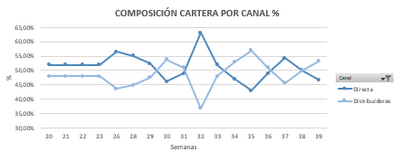
thank you very much, but to be able to make a line chart that shows in % ?
that I need to replicate
Best regards
You need the following measure:
% por canal =
VAR _ALL = CALCULATE ([Measure Sum Deuda], ALL(fTable[Canal])
RETURN
DIVIDE([Measure Sum Deuda]), _ALL)
Format this measure as a % in the ribbon
then create the line chart using this measure and add fTable[Canal] as the legend
Proud to be a Super User!
Paul on Linkedin.
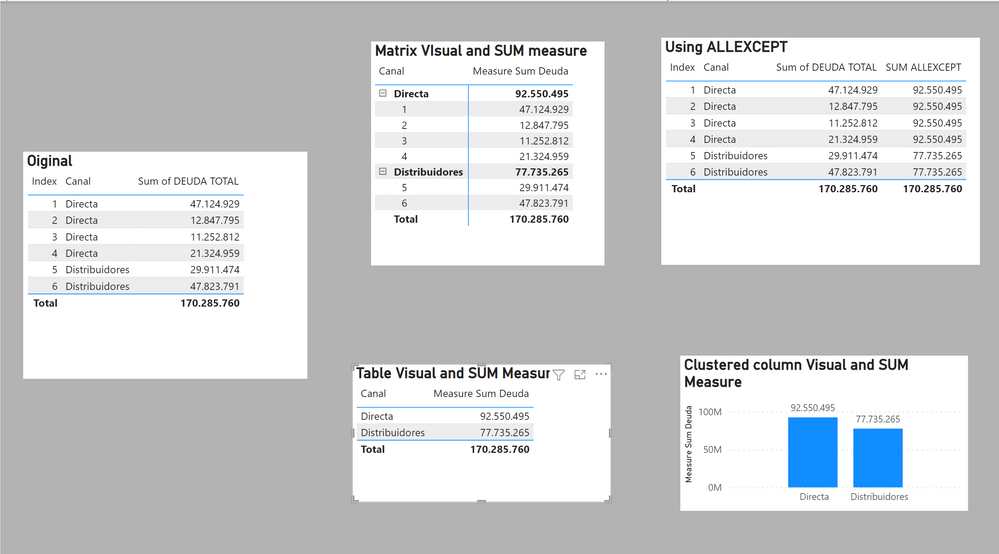
You can show the totals by "Canal" in any number of ways: for example using a simple SUM measure or using ALLEXCEPT as a filter in a measure:
Measure Sum Deuda =
SUM(fTable[DEUDA TOTAL])SUM ALLEXCEPT =
CALCULATE([Measure Sum Deuda], ALLEXCEPT(fTable, fTable[Canal]))
I've attached the sample PBIX file
Proud to be a Super User!
Paul on Linkedin.
The Power BI Data Visualization World Championships is back! Get ahead of the game and start preparing now!
| User | Count |
|---|---|
| 38 | |
| 37 | |
| 33 | |
| 32 | |
| 29 |
| User | Count |
|---|---|
| 132 | |
| 88 | |
| 82 | |
| 68 | |
| 64 |