
Get certified for free when you join Fabric Data Days 2026 and dive into Fabric, Power BI, SQL, AI, and other essential data skills.
Join nowTry your skills in the Power BI Dataviz World Championship! Round one ends June 26. Join now
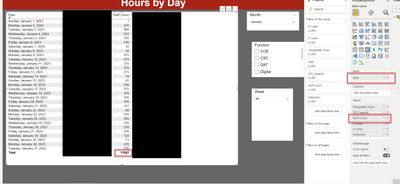
I used the following formula within a measure as suggested however my total is incorrect. The total for Staff Count column should be 8,850.
SUM DISTINCT COUNT =
VAR _DISTINCTCOUNT =
CALCULATE ( DISTINCTCOUNT ( 'tblTimeCombined_TimeDetail'[Staff ID] ) )
RETURN
SUMX (
SUMMARIZE (
'tblTimeCombined_TimeDetail',
'tblTimeCombined_TimeDetail'[Date]
),
_DISTINCTCOUNT
)
Here are the more details. Refer to red boxes for more details.
Solved! Go to Solution.
Hi @aritz001 ,
Can you try using this measure instead -
Measure = SUMX(SUMMARIZE('tblTimeCombined_TimeDetail',
'tblTimeCombined_TimeDetail'[Date],"count", DISTINCTCOUNT ( 'tblTimeCombined_TimeDetail'[Staff ID] ) ),[count])
Hope this helps!
Thanks,
Avantika Thakur
@aritz001 First, please vote for this idea: https://ideas.powerbi.com/ideas/idea/?ideaid=082203f1-594f-4ba7-ac87-bb91096c742e
This looks like a measure totals problem. Very common. See my post about it here: https://community.powerbi.com/t5/DAX-Commands-and-Tips/Dealing-with-Measure-Totals/td-p/63376
Also, this Quick Measure, Measure Totals, The Final Word should get you what you need:
https://community.powerbi.com/t5/Quick-Measures-Gallery/Measure-Totals-The-Final-Word/m-p/547907
Also: https://youtu.be/uXRriTN0cfY
And: https://youtu.be/n4TYhF2ARe8
Hi @aritz001 ,
Can you try using this measure instead -
Measure = SUMX(SUMMARIZE('tblTimeCombined_TimeDetail',
'tblTimeCombined_TimeDetail'[Date],"count", DISTINCTCOUNT ( 'tblTimeCombined_TimeDetail'[Staff ID] ) ),[count])
Hope this helps!
Thanks,
Avantika Thakur
| User | Count |
|---|---|
| 22 | |
| 20 | |
| 19 | |
| 19 | |
| 11 |
| User | Count |
|---|---|
| 61 | |
| 54 | |
| 46 | |
| 44 | |
| 34 |