cancel
Showing results for 
Search instead for 
Did you mean: 

Try your skills in the Power BI Dataviz World Championship! Round one ends June 26. Join now

Reply
gunner
Frequent Visitor

Help with Time difference between multiple rows & Index

Hi guys, I had previously marked this as solved but I have noticed something which is throwing off my calculations. I am using an
index field to calculate the difference between the times of an item being acquired and it being released.

The query language for the index is from earlier in this thread and it wokrs fine until an item is acquired and released at the
exact same time for a user. The Index assigns both actions the same value, which throws out the calculations quite substantially.


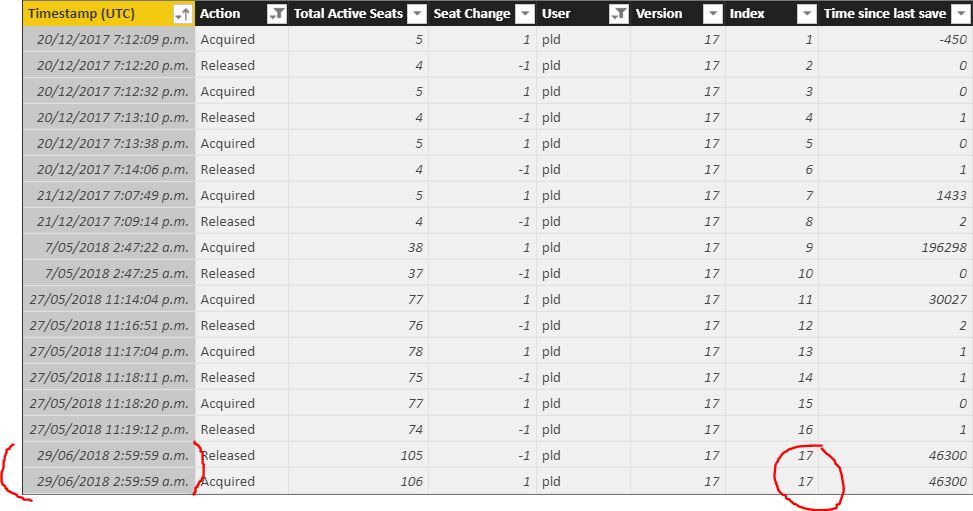
Example in the image below, where the last 2 lines an item is acquired and released at same time and both are assigned the same
index value (17). Ideally i want the index to assign the value of 17&18, or even just disregard this altogether as the
corresponding time value would be zero. I have tested it by manually deleting those last 2 entries from the datasource and the
calculations are perfect. I need same values to be removed, or assigned the correct index value. Thank you if you can help.


Index Query:

Index = 
IF (
    OR ( 'OpenLicenseUsage-9601427'[Action] = "Released", 'OpenLicenseUsage-9601427'[Action] = "Acquired" ),
    RANKX (
        FILTER (
            ALL ( 'OpenLicenseUsage-9601427'),
            OR ( 'OpenLicenseUsage-9601427'[Action] = "Released", 'OpenLicenseUsage-9601427'[Action] = "Acquired" )
                && 'OpenLicenseUsage-9601427'[User] = EARLIER ( 'OpenLicenseUsage-9601427'[User] )
        ),
        'OpenLicenseUsage-9601427'[Timestamp (UTC)],
        ,
        asc
    )
)
Capture.JPG


1 ACCEPTED SOLUTION
v-jiascu-msft
Microsoft Employee
Microsoft Employee

Hi @gunner,


I would suggest you add an index in the Query Editor and then make a little change of your formula. 

Index = 
IF (
    OR ( 'OpenLicenseUsage-9601427'[Action] = "Released", 'OpenLicenseUsage-9601427'[Action] = "Acquired" ),
    RANKX (
        FILTER (
            ALL ( 'OpenLicenseUsage-9601427'),
            OR ( 'OpenLicenseUsage-9601427'[Action] = "Released", 'OpenLicenseUsage-9601427'[Action] = "Acquired" )
                && 'OpenLicenseUsage-9601427'[User] = EARLIER ( 'OpenLicenseUsage-9601427'[User] )
        ),
        'OpenLicenseUsage-9601427'[Index],
        ,
        asc
    )
)


Best Regards,

Dale

Community Support Team _ Dale
If this post helps, then please consider Accept it as the solution to help the other members find it more quickly.

View solution in original post

2 REPLIES 2
v-jiascu-msft
Microsoft Employee
Microsoft Employee

Hi @gunner,


Could you please mark the proper answer as a solution?


Best Regards,

Dale

Community Support Team _ Dale
If this post helps, then please consider Accept it as the solution to help the other members find it more quickly.
v-jiascu-msft
Microsoft Employee
Microsoft Employee

Hi @gunner,


I would suggest you add an index in the Query Editor and then make a little change of your formula. 

Index = 
IF (
    OR ( 'OpenLicenseUsage-9601427'[Action] = "Released", 'OpenLicenseUsage-9601427'[Action] = "Acquired" ),
    RANKX (
        FILTER (
            ALL ( 'OpenLicenseUsage-9601427'),
            OR ( 'OpenLicenseUsage-9601427'[Action] = "Released", 'OpenLicenseUsage-9601427'[Action] = "Acquired" )
                && 'OpenLicenseUsage-9601427'[User] = EARLIER ( 'OpenLicenseUsage-9601427'[User] )
        ),
        'OpenLicenseUsage-9601427'[Index],
        ,
        asc
    )
)


Best Regards,

Dale

Community Support Team _ Dale
If this post helps, then please consider Accept it as the solution to help the other members find it more quickly.

Helpful resources

Announcements
Fabric Data Days is here Carousel

Fabric Data Days 2026

Don't miss out on Data Days, June 15 through August 7. Learn Fabric, Power BI, SQL, AI and more.

May Power BI Update Carousel

Power BI Monthly Update - May 2026

Check out the May 2026 Power BI update to learn about new features.

Power BI DataViz World Championships carousel

Power BI DataViz World Championships - June 2026

A new Power BI DataViz World Championship is coming this June! Don't miss out on submitting your entry.