This is best Fabric, Power BI, SQL and AI community event. How do we know? The last event sold out! Save €200 with code FABCMTY200.
Register nowA new Data Days event is coming soon! This time we’re going bigger than ever. Fabric, Power BI, SQL, AI and more. Don't miss out.
Hi,
Need help for Synoptic Panel. So I have a data of Risk which in Matrix visual is already correct. The raw data is like this :
| Category_________ | Severity_________ | Likelihood_________ | SeverityLikelihood_________ |
| People | 4 | 4 | 44 |
| People | 4 | 4 | 44 |
| People | 2 | 5 | 25 |
| People | 5 | 5 | 55 |
| Assets | 4 | 2 | 42 |
| Assets | 5 | 2 | 52 |
| Assets | 4 | 2 | 42 |
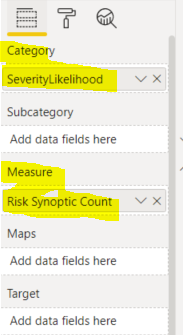
And in Power BI, created a simple measure like this :
And then I've created a Synoptic Design in which I map the combination of SeverityLikelihood in each of the block. Back in Power BI, import the image in Synoptic Panel while put the Category and Measure with its data.
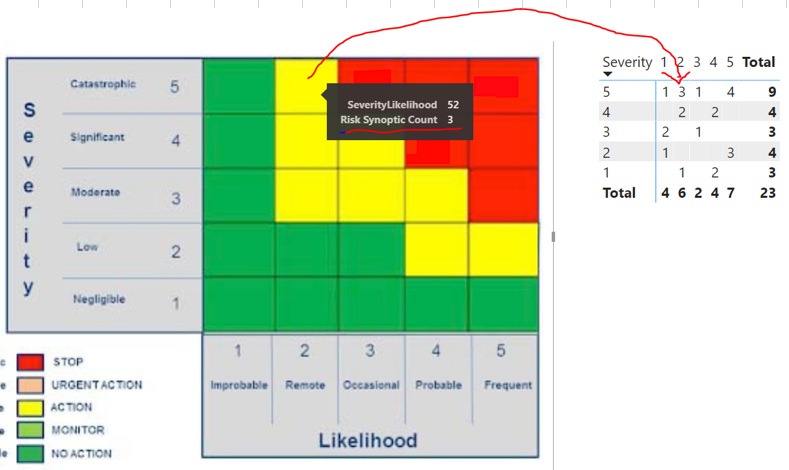
The result is actually correct, but somehow the value is not appear in the box. I have to hover my mouse then in tooltips I can see the value is correct.
If you see the picture, the tooltips is correct, compared to the right whcih is the Matrix Visual of it.
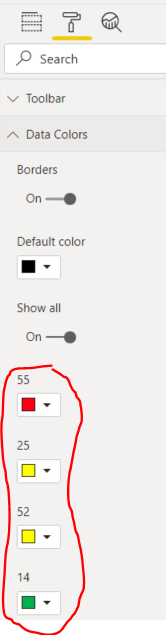
In the properties of this visual, the Data value only manage the background color, whcih is I have to put the same color as the image. But there is no setting for Data Value, or have I missed something ?
Any help will be appreciated.
Thanks,
Solved! Go to Solution.
Hi @admin_xlsior ,
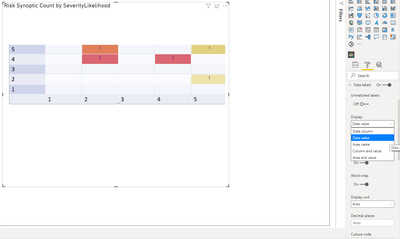
You need to turn on the data labels and chosse the data values in the settings:
Don't mind the colours.
Regards
Miguel Félix
Proud to be a Super User!
Check out my blog: Power BI em PortuguêsHi @admin_xlsior ,
You need to turn on the data labels and chosse the data values in the settings:
Don't mind the colours.
Regards
Miguel Félix
Proud to be a Super User!
Check out my blog: Power BI em PortuguêsCheck out the May 2026 Power BI update to learn about new features.
Sign up to receive a private message when registration opens and key events begin.
If you have recently started exploring Fabric, we'd love to hear how it's going. Your feedback can help with product improvements.
| User | Count |
|---|---|
| 27 | |
| 25 | |
| 22 | |
| 20 | |
| 14 |
| User | Count |
|---|---|
| 50 | |
| 47 | |
| 23 | |
| 18 | |
| 18 |