
cancel
Showing results for 
Search instead for 
Did you mean: 

The Power BI Data Visualization World Championships is back! Get ahead of the game and start preparing now! Learn more

Reply
benoit_chaceau
Frequent Visitor

Help with SQL to DAX (subquery select from select)

Hello,

I am having difficulty translating this SQL query with a subquery (SELECT FROM SELECT) to DAX:


SELECT   Kids.[age]
	,Kids.[number]
	,Kids.[rank_age]
FROM (
	SELECT	ROW_NUMBER() OVER(ORDER BY COUNT([id_kid]) DESC) AS rank_age
		,[age]
		,COUNT([id]) AS number
        FROM [dbo].[School]
	WHERE [hair_color] in (3,4)
	AND [age] in (1,2,3,4,5)
        GROUP BY [age]
) as Kids
WHERE Kids.[age] = 4


What I am trying to do is to sort kids by age, count them, and establish a ranking.

I am using a subquery to be able to get the exact rank for certain age (for example 4) of the kids.


This is how I create the measure 'rank_age' in Power BI:


rank_age = RANKX ( ALLSELECTED ( Kids[age]) ; [number] )

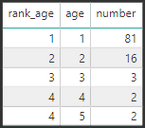
And this is what I get by filtering on the age (1, 2, 3, 4 and 5):


2018-09-13 18_39_04-Car_accidents_new - Power BI Desktop.png


2018_09_13_18_36_55_Car_accidents_new_Power_BI_Desktop.png


What I now want to do is to use another filter to display only some of the ages, but maintaining the right ranks (the reason I'm using a subquery in the SQL script).


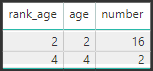
The result would be something like this (if I filter on the ages of 2 and 4):


2018_09_13_18_36_55_Car_accidents_new_Power_BI_Desktop2.png


I don't know which function to use in order to get the above result. Maybe it just can't be done with such method...

Any help would be very appreciated!


Thank you.

1 ACCEPTED SOLUTION
Anonymous
Not applicable

HI @benoit_chaceau,


You can try to use below formula if it suitable for your requirement:

Kids =
VAR summary =
    SUMMARIZE (
        FILTER (
            ALL ( School ),
            [hair_color] IN { 3, 4 }
                && [age] IN { 1, 2, 3, 4, 5 }
        ),
        [Age],
        "number", COUNT ( School[id_kid] )
    )
RETURN
    FILTER (
        ADDCOLUMNS ( summary, "Rank", RANKX ( summary, [number],, DESC, DENSE ) ),
        [age] = 4
    )

If above not help, please share some sample data for test.


Regards,

Xiaoxin Sheng

View solution in original post

2 REPLIES 2
Anonymous
Not applicable

HI @benoit_chaceau,


You can try to use below formula if it suitable for your requirement:

Kids =
VAR summary =
    SUMMARIZE (
        FILTER (
            ALL ( School ),
            [hair_color] IN { 3, 4 }
                && [age] IN { 1, 2, 3, 4, 5 }
        ),
        [Age],
        "number", COUNT ( School[id_kid] )
    )
RETURN
    FILTER (
        ADDCOLUMNS ( summary, "Rank", RANKX ( summary, [number],, DESC, DENSE ) ),
        [age] = 4
    )

If above not help, please share some sample data for test.


Regards,

Xiaoxin Sheng

Hello @Anonymous


Thank you for your answer, it worked!

Now I have a better understanding of the SUMMARIZE function, thank you so much.


Regards,

Helpful resources

Announcements
Power BI DataViz World Championships

Power BI Dataviz World Championships

The Power BI Data Visualization World Championships is back! Get ahead of the game and start preparing now!

December 2025 Power BI Update Carousel

Power BI Monthly Update - December 2025

Check out the December 2025 Power BI Holiday Recap!

FabCon Atlanta 2026 carousel

FabCon Atlanta 2026

Join us at FabCon Atlanta, March 16-20, for the ultimate Fabric, Power BI, AI and SQL community-led event. Save $200 with code FABCOMM.