Join us at FabCon Atlanta from March 16 - 20, 2026, for the ultimate Fabric, Power BI, AI and SQL community-led event. Save $200 with code FABCOMM.
Register now!Learn from the best! Meet the four finalists headed to the FINALS of the Power BI Dataviz World Championships! Register now
I can't seem to figure out how to write DAX to calculate what's in column Running Balance. The Reserve Beginning Balance is what starts the calculation on a year basis and each month Reserve is added to it.
Reserve Beginning Balance + Reserve = Running Balance.
Any ideas how I would calculate Running Balance?
yearMonth Reserve Reserve Balance YTD Reserve Beginning Balance Running Balance
3/1/2017 ($11,100) $107,000.00 $0.00 ($1,457,600.00)
2/1/2017 $63,600 $118,100.00 $0.00 ($1,382,900.00)
1/1/2017 $54,500 ($1,446,500.00) ($1,501,000.00) ($1,446,500.00)
Solved! Go to Solution.
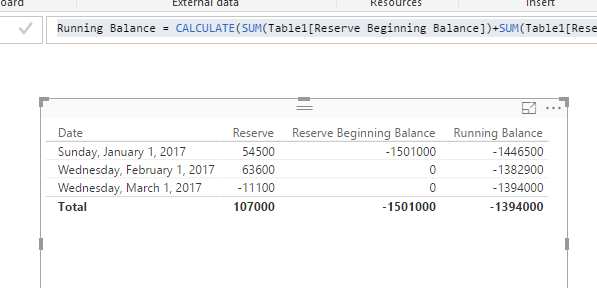
I can't understand why the Running Balance for 3/1 is ($1,457,600.00). Based on your logic, it should be a cumulative sum for those two columns, you just need to create a YTD measure.
Running Balance =
CALCULATE (
SUM ( Table1[Reserve Beginning Balance] ) + SUM ( Table1[Reserve] ),
FILTER (
ALL ( Table1 ),
Table1[Date] <= MAX ( Table1[Date] )
&& Table1[Date] >= DATE ( YEAR ( MAX ( Table1[Date] ) ), 1, 1 )
)
)
Regards,
Hi
Can you clearly explain the logic that used to derive the values of running balance column?
Thanks
Hari
I can't understand why the Running Balance for 3/1 is ($1,457,600.00). Based on your logic, it should be a cumulative sum for those two columns, you just need to create a YTD measure.
Running Balance =
CALCULATE (
SUM ( Table1[Reserve Beginning Balance] ) + SUM ( Table1[Reserve] ),
FILTER (
ALL ( Table1 ),
Table1[Date] <= MAX ( Table1[Date] )
&& Table1[Date] >= DATE ( YEAR ( MAX ( Table1[Date] ) ), 1, 1 )
)
)
Regards,
It would seem that you could just create a measure that was a running total of Reserve and then simply add that to your Reserve Beginning Balance of your MIN date?
Share feedback directly with Fabric product managers, participate in targeted research studies and influence the Fabric roadmap.
Check out the February 2026 Power BI update to learn about new features.
| User | Count |
|---|---|
| 66 | |
| 60 | |
| 45 | |
| 19 | |
| 15 |
| User | Count |
|---|---|
| 109 | |
| 108 | |
| 39 | |
| 30 | |
| 27 |