cancel
Showing results for 
Search instead for 
Did you mean: 

The Power BI Data Visualization World Championships is back! Get ahead of the game and start preparing now! Learn more

Reply
jdugas
Advocate I
Advocate I

Help with Running Total

I can't seem to figure out how to write DAX to calculate what's in column Running Balance. The Reserve Beginning Balance is what starts the calculation on a year basis and each month Reserve is added to it.


Reserve Beginning Balance + Reserve = Running Balance.


Any ideas how I would calculate Running Balance?


yearMonth  Reserve           Reserve Balance YTD          Reserve Beginning Balance              Running Balance
3/1/2017     ($11,100)         $107,000.00                       $0.00                                                 ($1,457,600.00)
2/1/2017     $63,600           $118,100.00                       $0.00                                                 ($1,382,900.00)
1/1/2017     $54,500           ($1,446,500.00)                  ($1,501,000.00)                                  ($1,446,500.00)

1 ACCEPTED SOLUTION
v-sihou-msft
Microsoft Employee
Microsoft Employee

@jdugas


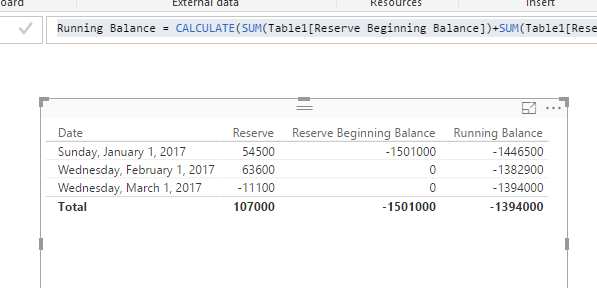
I can't understand why the Running Balance for 3/1 is ($1,457,600.00). Based on your logic, it should be a cumulative sum for those two columns, you just need to create a YTD measure.


Running Balance =
CALCULATE (
    SUM ( Table1[Reserve Beginning Balance] ) + SUM ( Table1[Reserve] ),
    FILTER (
        ALL ( Table1 ),
        Table1[Date] <= MAX ( Table1[Date] )
            && Table1[Date] >= DATE ( YEAR ( MAX ( Table1[Date] ) ), 1, 1 )
    )
)

5.PNG


Regards,

View solution in original post

3 REPLIES 3
Anonymous
Not applicable

Hi


 Can you clearly explain the logic that used to derive the values of running balance column?  


Thanks

Hari

v-sihou-msft
Microsoft Employee
Microsoft Employee

@jdugas


I can't understand why the Running Balance for 3/1 is ($1,457,600.00). Based on your logic, it should be a cumulative sum for those two columns, you just need to create a YTD measure.


Running Balance =
CALCULATE (
    SUM ( Table1[Reserve Beginning Balance] ) + SUM ( Table1[Reserve] ),
    FILTER (
        ALL ( Table1 ),
        Table1[Date] <= MAX ( Table1[Date] )
            && Table1[Date] >= DATE ( YEAR ( MAX ( Table1[Date] ) ), 1, 1 )
    )
)

5.PNG


Regards,

Greg_Deckler
Community Champion
Community Champion

It would seem that you could just create a measure that was a running total of Reserve and then simply add that to your Reserve Beginning Balance of your MIN date?


Follow on LinkedIn
@ me in replies or I'll lose your thread!!!
Instead of a Kudo, please vote for this idea
Become an expert!: Enterprise DNA
External Tools: MSHGQM
YouTube Channel!: Microsoft Hates Greg
Latest book!:
DAX For Humans

DAX is easy, CALCULATE makes DAX hard...

Helpful resources

Announcements
Power BI DataViz World Championships

Power BI Dataviz World Championships

The Power BI Data Visualization World Championships is back! Get ahead of the game and start preparing now!

December 2025 Power BI Update Carousel

Power BI Monthly Update - December 2025

Check out the December 2025 Power BI Holiday Recap!

FabCon Atlanta 2026 carousel

FabCon Atlanta 2026

Join us at FabCon Atlanta, March 16-20, for the ultimate Fabric, Power BI, AI and SQL community-led event. Save $200 with code FABCOMM.