
Join us at FabCon Atlanta from March 16 - 20, 2026, for the ultimate Fabric, Power BI, AI and SQL community-led event. Save $200 with code FABCOMM.
Register now!Vote for your favorite vizzies from the Power BI Dataviz World Championship submissions. Vote now!
Hi peep's I need some help to see what I have done wrong, I am new to this and I'm still learning DAX.
I am adding a measure to my table to give me an age category for KPI's.
Age Category = if('PBO test 1 - Client Details'[Age]=blank(),blank(),if('PBO test 1 - Client Details'[Age]<18,"16-17",if('PBO test 1 - Client Details'[Age]<20,"18-19",if('PBO test 1 - Client Details'[Age]<22,"20-21",if('PBO test 1 - Client Details'[Age]<24,"22-23",if(‘PBO Client Details’[Age]<25 ”24”,”>25”)))))
Whilst we record the individual ages, the KPI asks for a count of 16-17, 18-19, 20-21, 22-23, 24 and 25.
So the column [Age] is just a list of numbers = for each clients age.
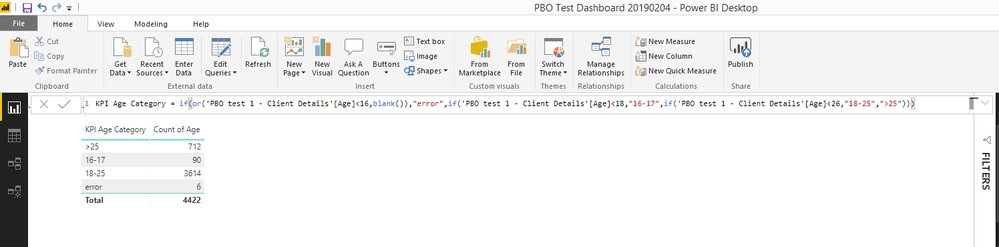
This is what I get
Any help to point me in the right direction gratefully received.
Solved! Go to Solution.
Hi @DemoFour,
With your measure, you could not just use the column ['PBO test 1 - Client Details'[Age]], you could try to convert the 'PBO test 1 - Client Details'[Age] to CALCULATE(SUM('PBO test 1 - Client Details'[Age])) in your formula.
Regards,
Daniel He
Hi @DemoFour,
With your measure, you could not just use the column ['PBO test 1 - Client Details'[Age]], you could try to convert the 'PBO test 1 - Client Details'[Age] to CALCULATE(SUM('PBO test 1 - Client Details'[Age])) in your formula.
Regards,
Daniel He
Thank's for your reply.
I got the following to work
But whilst the suggestion you made worked, I could not traslate it into visual. I think I need to do some more work on understanding CALCULATE and SUM to understand them better within BI.
kind regards
Hi @DemoFour ,
It is pleasant that your first issue could be solved, could you please mark my reply as answered if possible?
And with your second issue, I suggest to you to re-create a topic in the community and you could also refer to below link about CALCULATE:
https://www.absentdata.com/power-bi/how-to-use-calculate-in-power-bi/
https://databear.com/power-bi-tips-calculate-one-of-the-most-used-dax-functions/
Regards,
Daniel He
Vote for your favorite vizzies from the Power BI World Championship submissions!
If you love stickers, then you will definitely want to check out our Community Sticker Challenge!
Check out the January 2026 Power BI update to learn about new features.
| User | Count |
|---|---|
| 65 | |
| 51 | |
| 42 | |
| 23 | |
| 21 |
| User | Count |
|---|---|
| 137 | |
| 116 | |
| 52 | |
| 37 | |
| 31 |