Don't miss your chance to take the Fabric Data Engineer (DP-700) exam on us!
Learn moreWe've captured the moments from FabCon & SQLCon that everyone is talking about, and we are bringing them to the community, live and on-demand. Starts on April 14th. Register now
I'm having issue creating a very simple chart and would appreciate some help.
My data looks like this:
Order # Region State Apple Banana Orange Grape Pineapple
A-001 South LA x x x x x
A-002 East NY x x x
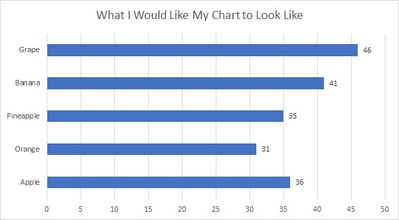
I would like to create a bar chart like the one below, with Region and State as slicers. And I can't seem to create this simple chart.
Any help is greatly appreciated.
Sample file: https://drive.google.com/file/d/1aFz-bNYsWiNQ4yFhN6N6Uc7rqiOEqBFH/view?usp=sharing
Solved! Go to Solution.
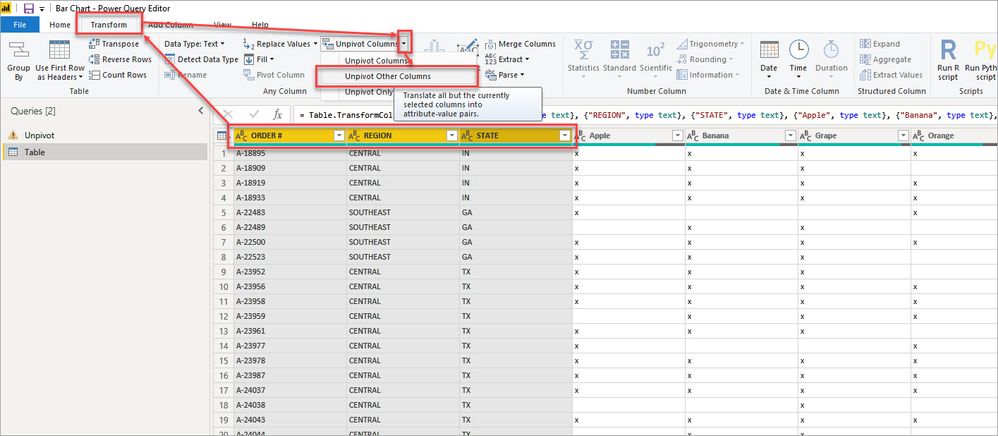
In the query editor, select the order, region, and state columns the go to transform > unpivot > unpivot other columns:
Then select the Value column and remove blanks, leave only the X's
Rename Attribute to Fruit and click close and apply.
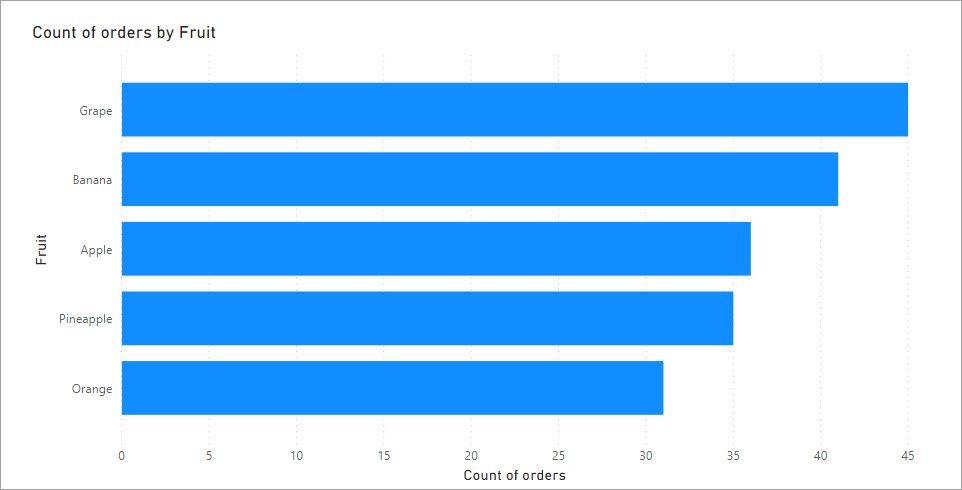
Then you can add the fruit column to the axis and a simple measure to count the rows of the table to get your count by fruit.
I have attached my sample .pbix for you to look at.
In the query editor, select the order, region, and state columns the go to transform > unpivot > unpivot other columns:
Then select the Value column and remove blanks, leave only the X's
Rename Attribute to Fruit and click close and apply.
Then you can add the fruit column to the axis and a simple measure to count the rows of the table to get your count by fruit.
I have attached my sample .pbix for you to look at.
Worked beautifully in Import mode. Thank you!
Out of curiosity, is there a similar function if using Live Connection to a SSAS tabular cube?
You don't have the transform options when connecting to a SSAS model but you could transform the data before feeding it into SSAS using a UNION in a SQL view that would replicate the unpivot.
I'll give UNION a try. At least now I have a back-up plan if that doesn't work out.
Thank you again. Appreciated.
If you have recently started exploring Fabric, we'd love to hear how it's going. Your feedback can help with product improvements.
A new Power BI DataViz World Championship is coming this June! Don't miss out on submitting your entry.
Share feedback directly with Fabric product managers, participate in targeted research studies and influence the Fabric roadmap.
| User | Count |
|---|---|
| 56 | |
| 40 | |
| 36 | |
| 20 | |
| 18 |
| User | Count |
|---|---|
| 73 | |
| 73 | |
| 38 | |
| 35 | |
| 26 |