cancel
Showing results for 
Search instead for 
Did you mean: 

Try your skills in the Power BI Dataviz World Championship! Round one ends June 26. Join now

Reply
TD21
Helper II
Helper II

Help with Creating a Simple Chart

I'm having issue creating a very simple chart and would appreciate some help.


My data looks like this:

Order #    Region    State    Apple   Banana   Orange   Grape   Pineapple

A-001      South     LA        x        x        x        x      x

A-002      East      NY        x                 x        x


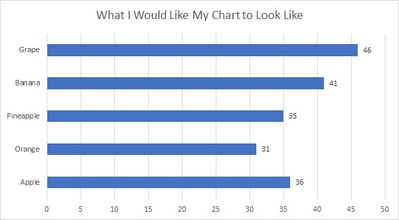
I would like to create a bar chart like the one below, with Region and State as slicers. And I can't seem to create this simple chart. Smiley Sad  Any help is greatly appreciated.


Sample file: https://drive.google.com/file/d/1aFz-bNYsWiNQ4yFhN6N6Uc7rqiOEqBFH/view?usp=sharing 


Chart.jpg


1 ACCEPTED SOLUTION
jdbuchanan71
Super User
Super User

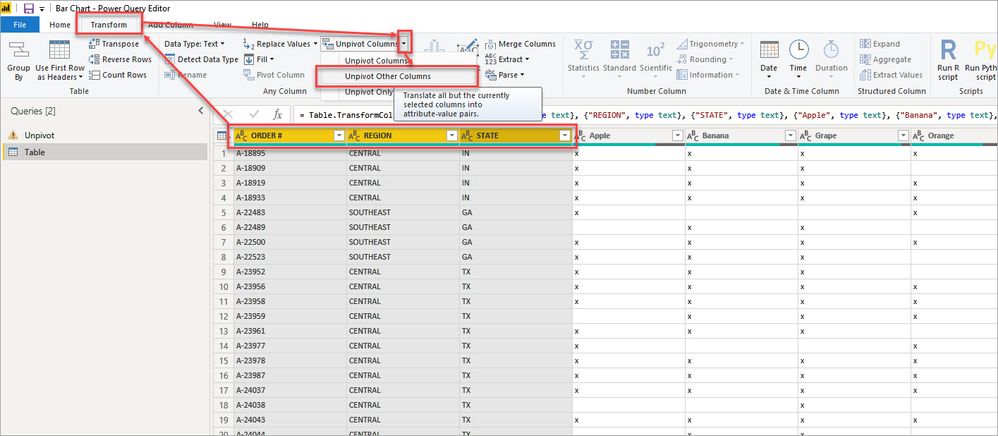
In the query editor, select the order, region, and state columns the go to transform > unpivot > unpivot other columns:unpivotother.jpg

Then select the Value column and remove blanks, leave only the X's

Rename Attribute to Fruit and click close and apply.

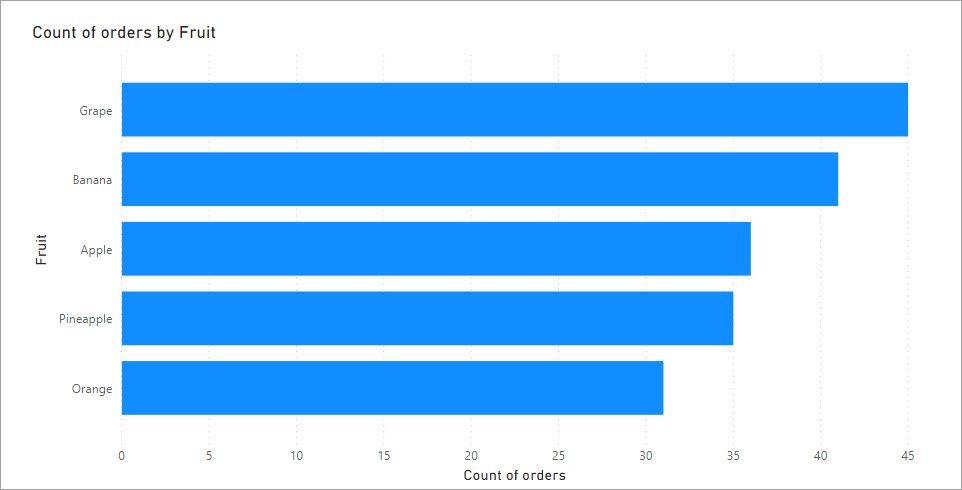
Then you can add the fruit column to the axis and a simple measure to count the rows of the table to get your count by fruit.CountFruit.jpg

I have attached my sample .pbix for you to look at.

View solution in original post

4 REPLIES 4
jdbuchanan71
Super User
Super User

In the query editor, select the order, region, and state columns the go to transform > unpivot > unpivot other columns:unpivotother.jpg

Then select the Value column and remove blanks, leave only the X's

Rename Attribute to Fruit and click close and apply.

Then you can add the fruit column to the axis and a simple measure to count the rows of the table to get your count by fruit.CountFruit.jpg

I have attached my sample .pbix for you to look at.

Worked beautifully in Import mode. Thank you!


Out of curiosity, is there a similar function if using Live Connection to a SSAS tabular cube?

You don't have the transform options when connecting to a SSAS model but you could transform the data before feeding it into SSAS using a UNION in a SQL view that would replicate the unpivot.

I'll give UNION a try. At least now I have a back-up plan if that doesn't work out.


Thank you again. Appreciated.

Helpful resources

Announcements
Fabric Data Days is here Carousel

Data Days 2026

Don't miss out on Data Days, June 15 through August 7. Learn Fabric, Power BI, SQL, AI and more.

May Power BI Update Carousel

Power BI Monthly Update - May 2026

Check out the May 2026 Power BI update to learn about new features.

Power BI DataViz World Championships carousel

Power BI DataViz World Championships - June 2026

A new Power BI DataViz World Championship is coming this June! Don't miss out on submitting your entry.