This time we’re going bigger than ever. Fabric, Power BI, SQL, AI and more. We're covering it all. You won't want to miss it.
Learn moreGet Fabric Certified for FREE during AI Skills Fest. This week only. Secure your voucher now.
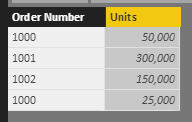
I need to create a calculated column "Total Units" that totals the unit sales by Order Number without reference to row context. I need the total as a calculated column since I will create a new dimension based on the size of the total. Unit Category = if [Total Units] < 100000 then "Small" else "Big"
See example below. I need a formula so that for each row where it shows order number "1000", that the new Total Units column total is 75,000.
This seems like it should be easy, but I have spent all day trying to figure this out. Sorry, I'm a newbie.
Solved! Go to Solution.
=calculate(sum(table[units]),filter(table,table[ordernumber]=earlier(table[ordernumber]))
be sure to write only 1 calculated colum, not 2. Get the one above working first, then modify it to return "big" or "small". This is better than having 2 columns
=calculate(sum(table[units]),filter(table,table[ordernumber]=earlier(table[ordernumber]))
be sure to write only 1 calculated colum, not 2. Get the one above working first, then modify it to return "big" or "small". This is better than having 2 columns
Worked perfect Matt. Thanks so much. I had not even heard of the EARLIER function until just now.
Check out the May 2026 Power BI update to learn about new features.
Sign up to receive a private message when registration opens and key events begin.
If you have recently started exploring Fabric, we'd love to hear how it's going. Your feedback can help with product improvements.
| User | Count |
|---|---|
| 25 | |
| 24 | |
| 22 | |
| 19 | |
| 18 |
| User | Count |
|---|---|
| 43 | |
| 42 | |
| 41 | |
| 21 | |
| 21 |