cancel
Showing results for 
Search instead for 
Did you mean: 

We've captured the moments from FabCon & SQLCon that everyone is talking about, and we are bringing them to the community, live and on-demand. Starts on April 14th. Register now

Reply
bhorvati
Frequent Visitor

Help with Column Calculation

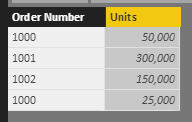
I need to create a calculated column "Total Units" that totals the unit sales by Order Number without reference to row context.   I need the total as a calculated column since I will create a new dimension based on the size of the total.   Unit Category = if [Total Units] < 100000 then "Small" else "Big"


See example below.  I need a formula so that for each row where it shows order number "1000", that the new Total Units column total is 75,000.


This seems like it should be easy, but I have spent all day trying to figure this out.   Sorry, I'm a newbie. 


example.PNG

1 ACCEPTED SOLUTION
MattAllington
Community Champion
Community Champion

=calculate(sum(table[units]),filter(table,table[ordernumber]=earlier(table[ordernumber]))


be sure to write only 1 calculated colum, not 2. Get the one above working first, then modify it to return "big" or "small". This is better than having 2 columns


* Matt is an 8 times Microsoft MVP (Power BI) and author of the Power BI Book Supercharge Power BI.
I will not give you bad advice, even if you unknowingly ask for it.

View solution in original post

2 REPLIES 2
MattAllington
Community Champion
Community Champion

=calculate(sum(table[units]),filter(table,table[ordernumber]=earlier(table[ordernumber]))


be sure to write only 1 calculated colum, not 2. Get the one above working first, then modify it to return "big" or "small". This is better than having 2 columns


* Matt is an 8 times Microsoft MVP (Power BI) and author of the Power BI Book Supercharge Power BI.
I will not give you bad advice, even if you unknowingly ask for it.

Worked perfect Matt.  Thanks so much.   I had not even heard of the EARLIER function until just now.  

Helpful resources

Announcements
New to Fabric survey Carousel

New to Fabric Survey

If you have recently started exploring Fabric, we'd love to hear how it's going. Your feedback can help with product improvements.

Power BI DataViz World Championships carousel

Power BI DataViz World Championships - June 2026

A new Power BI DataViz World Championship is coming this June! Don't miss out on submitting your entry.

Join our Fabric User Panel

Join our Fabric User Panel

Share feedback directly with Fabric product managers, participate in targeted research studies and influence the Fabric roadmap.

March Power BI Update Carousel

Power BI Community Update - March 2026

Check out the March 2026 Power BI update to learn about new features.