Get Fabric certified for FREE!
Don't miss your chance to take the Fabric Data Engineer (DP-700) exam on us!
Learn more- Power BI forums
- Get Help with Power BI
- Desktop
- Service
- Report Server
- Power Query
- Mobile Apps
- Developer
- DAX Commands and Tips
- Custom Visuals Development Discussion
- Health and Life Sciences
- Power BI Spanish forums
- Translated Spanish Desktop
- Training and Consulting
- Instructor Led Training
- Dashboard in a Day for Women, by Women
- Galleries
- Data Stories Gallery
- Themes Gallery
- Contests Gallery
- QuickViz Gallery
- Quick Measures Gallery
- Visual Calculations Gallery
- Notebook Gallery
- Translytical Task Flow Gallery
- TMDL Gallery
- R Script Showcase
- Webinars and Video Gallery
- Ideas
- Custom Visuals Ideas (read-only)
- Issues
- Issues
- Events
- Upcoming Events
We've captured the moments from FabCon & SQLCon that everyone is talking about, and we are bringing them to the community, live and on-demand. Starts on April 14th. Register now
- Power BI forums
- Forums
- Get Help with Power BI
- Desktop
- Re: Help with Chart Visualization
- Subscribe to RSS Feed
- Mark Topic as New
- Mark Topic as Read
- Float this Topic for Current User
- Bookmark
- Subscribe
- Printer Friendly Page


- Mark as New
- Bookmark
- Subscribe
- Mute
- Subscribe to RSS Feed
- Permalink
- Report Inappropriate Content
Help with Chart Visualization
Hello,
I've got this data from SQL server where it comes in this form
Jan | Feb | Mar | Apr | May | June | July | Aug | Sept | Oct | Nov | Dec
I am trying to represent it in a chart like shown below but it does not have an X axis so the chart always comes out looking this tight. I have tried to use vizualization section to space it out to no avail. Users do not like the chart in this fashion. Any advice would be helpful.
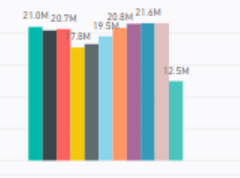
Solved! Go to Solution.


- Mark as New
- Bookmark
- Subscribe
- Mute
- Subscribe to RSS Feed
- Permalink
- Report Inappropriate Content
Hi @SimonSeez ,
Based on your description, select the Name column in power query and use 'Unpivot other columns', rename the Attribute column as 'Month' column, close and apply it.
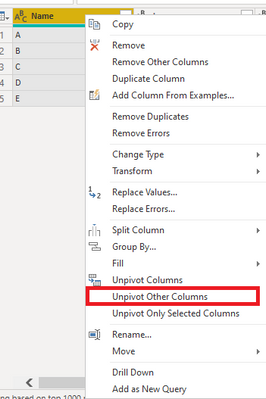
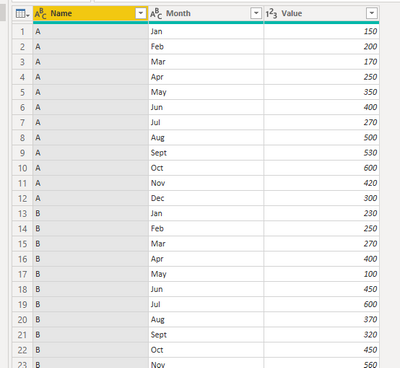
Create a calculated column like this to show the month by sort in the visual:
_Month =
SWITCH (
    [Month],
    "Jan", 1,
    "Feb", 2,
    "Mar", 3,
    "Apr", 4,
    "May", 5,
    "Jun", 6,
    "Jul", 7,
    "Aug", 8,
    "Sept", 9,
    "Oct", 10,
    "Nov", 11,
    "Dec", 12
)
Change the X-axis type to Categorical:

Attached a sample file in the below, hopes to help you.
Best Regards,
Community Support Team _ Yingjie Li
If this post helps, then please consider Accept it as the solution to help the other members find it more quickly.


- Mark as New
- Bookmark
- Subscribe
- Mute
- Subscribe to RSS Feed
- Permalink
- Report Inappropriate Content
@SimonSeez , You said 5000 Columns, seem like they Rows. Rows does not matter. I want unpivot not transpose (If I was not clear in last update)
refer: https://youtu.be/2HjkBtxSM0g
- Mark as New
- Bookmark
- Subscribe
- Mute
- Subscribe to RSS Feed
- Permalink
- Report Inappropriate Content
@SimonSeez , are these month columns or other column. If they are the only months they better to unpivot or transpose. can you give example of other columns
- Mark as New
- Bookmark
- Subscribe
- Mute
- Subscribe to RSS Feed
- Permalink
- Report Inappropriate Content
Hello @amitchandak
They are months on the columns (Jan to Dec ) and names of staff on the rows. The months contain financial data of value of business brought by each staff in a month.
The chart I am trying to make is showing the monthly trend so I use RLS to ensure each staff sees trends for only their columns.
Best Regards,
- Mark as New
- Bookmark
- Subscribe
- Mute
- Subscribe to RSS Feed
- Permalink
- Report Inappropriate Content
@SimonSeez , better to unpivot the data and then combine with year if needed and create a date.
https://radacad.com/pivot-and-unpivot-with-power-bi
Transpose : https://yodalearning.com/tutorials/power-query-helps-transposing-data/
- Mark as New
- Bookmark
- Subscribe
- Mute
- Subscribe to RSS Feed
- Permalink
- Report Inappropriate Content
Hello @amitchandak
Thank you for your feedback . I think I might have missed out some information that would make transposing it less of an option.
I actually get the data this way
Name | Jan | Feb | xxx | xxx | Dec
Simon | 999.9 | 456 | 3455 | 653
Thomas | 7888 | 8772 | 8872 | 888
And I have about 5,000 columns with different names. Would your recommendation still be to transpose?
Best Regards .
- Mark as New
- Bookmark
- Subscribe
- Mute
- Subscribe to RSS Feed
- Permalink
- Report Inappropriate Content
Hi @SimonSeez ,
Based on your description, select the Name column in power query and use 'Unpivot other columns', rename the Attribute column as 'Month' column, close and apply it.
Create a calculated column like this to show the month by sort in the visual:
_Month =
SWITCH (
    [Month],
    "Jan", 1,
    "Feb", 2,
    "Mar", 3,
    "Apr", 4,
    "May", 5,
    "Jun", 6,
    "Jul", 7,
    "Aug", 8,
    "Sept", 9,
    "Oct", 10,
    "Nov", 11,
    "Dec", 12
)
Change the X-axis type to Categorical:
Attached a sample file in the below, hopes to help you.
Best Regards,
Community Support Team _ Yingjie Li
If this post helps, then please consider Accept it as the solution to help the other members find it more quickly.
- Mark as New
- Bookmark
- Subscribe
- Mute
- Subscribe to RSS Feed
- Permalink
- Report Inappropriate Content
Thank you very much @v-yingjl
This works but how do I get the chart to calender months rather than month count.
Best Regards

Helpful resources

New to Fabric Survey
If you have recently started exploring Fabric, we'd love to hear how it's going. Your feedback can help with product improvements.

Power BI DataViz World Championships - June 2026
A new Power BI DataViz World Championship is coming this June! Don't miss out on submitting your entry.

Join our Fabric User Panel
Share feedback directly with Fabric product managers, participate in targeted research studies and influence the Fabric roadmap.

Power BI Community Update - March 2026
Check out the March 2026 Power BI update to learn about new features.

| User | Count |
|---|---|
| 53 | |
| 36 | |
| 33 | |
| 19 | |
| 17 |


| User | Count |
|---|---|
| 73 | |
| 72 | |
| 38 | |
| 35 | |
| 26 |


