This time we’re going bigger than ever. Fabric, Power BI, SQL, AI and more. We're covering it all. You won't want to miss it.
Learn moreDid you hear? There's a new SQL AI Developer certification (DP-800). Start preparing now and be one of the first to get certified. Register now
Hi,
I need to add one custom column called "rank" by using below expression :
sum(cast(booked != lag(booked,1)
Can Someone please help with the DAX/Measure expression.
Thanks in advance
Hi @Anonymous ,
Could you tell me if your problem has been solved? If it is, kindly Accept it as the solution. More people will benefit from it.
Best Regards,
Eyelyn Qin
Hi @Anonymous ,
Based on my researching, the LAG function returns values from a previous row in the table and the CAST function converts an expression from one datatype to another datatype.
But actually I'm not sure about your expected output, could please share more detail information to help us clarify your scenario?
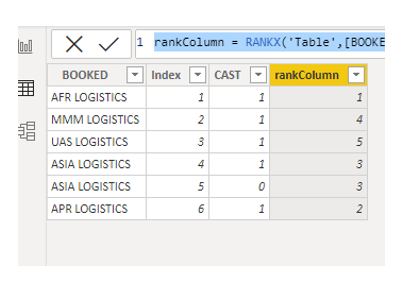
In case you want the final result as shown below:
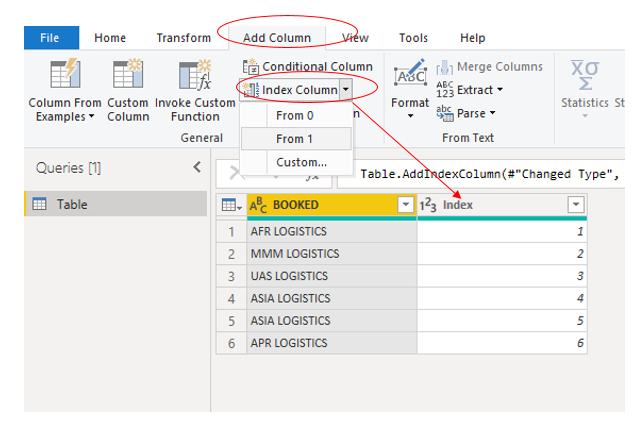
Please try LOOKUPVALUE() , RANKX() to add columns after adding a Index column in Power Query
CAST =
IF (
[BOOKED]
<> LOOKUPVALUE ( 'Table'[BOOKED], 'Table'[Index], [Index] - 1 ),
1,
0
)rankColumn =
RANKX ( 'Table', [BOOKED],, ASC, DENSE )
Here is the pbix file.
Best Regards,
Eyelyn Qin
If this post helps, then please consider Accept it as the solution to help the other members find it more quickly.
Check out the April 2026 Power BI update to learn about new features.
Sign up to receive a private message when registration opens and key events begin.
If you have recently started exploring Fabric, we'd love to hear how it's going. Your feedback can help with product improvements.
| User | Count |
|---|---|
| 35 | |
| 32 | |
| 27 | |
| 23 | |
| 16 |
| User | Count |
|---|---|
| 65 | |
| 50 | |
| 30 | |
| 25 | |
| 24 |