Share feedback directly with Fabric product managers, participate in targeted research studies and influence the Fabric roadmap.
Sign up nowGet Fabric certified for FREE! Don't miss your chance! Learn more
Hi.
I have a table for simple purposes lets say three columns:
A = Date
B = Total purchased
C = Color
Date is on X -axis
B is a column with how many items got purchased on this date
C is what color the items were.
I want a line to change dynamic when i change C in the filter..
But I can only get it to change both B & C at the same time.
Where am I going wrong?
Solved! Go to Solution.
Hi @Dauan
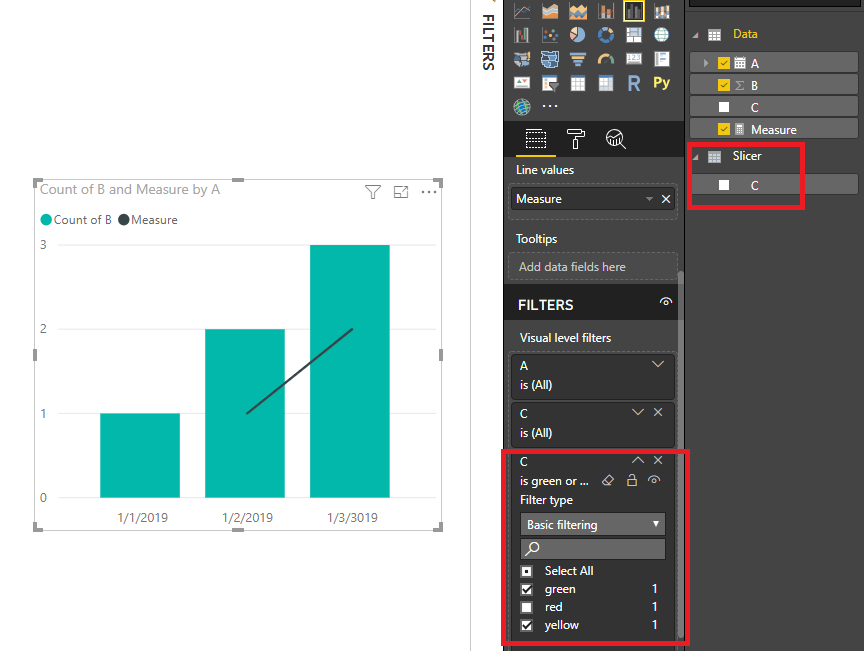
You may create a slicer table: Slicer = DISTINCT(Data[C]).Make sure there's no relationship between them.Then you may create a dynamic measure for C. Drag the Slicer table's column C to visual level filter or use it as slicer.Attached the sample file for your reference.
Measure =
CALCULATE (
COUNT ( Data[C] ),
FILTER ( Data, Data[C] IN VALUES ( 'Slicer'[C] ) )
)
Regards,
Cherie
Hi @Dauan
You may create a slicer table: Slicer = DISTINCT(Data[C]).Make sure there's no relationship between them.Then you may create a dynamic measure for C. Drag the Slicer table's column C to visual level filter or use it as slicer.Attached the sample file for your reference.
Measure =
CALCULATE (
COUNT ( Data[C] ),
FILTER ( Data, Data[C] IN VALUES ( 'Slicer'[C] ) )
)
Regards,
Cherie
If you love stickers, then you will definitely want to check out our Community Sticker Challenge!
Check out the January 2026 Power BI update to learn about new features.
| User | Count |
|---|---|
| 62 | |
| 60 | |
| 45 | |
| 21 | |
| 18 |
| User | Count |
|---|---|
| 122 | |
| 117 | |
| 37 | |
| 34 | |
| 30 |