Join us at FabCon Atlanta from March 16 - 20, 2026, for the ultimate Fabric, Power BI, AI and SQL community-led event. Save $200 with code FABCOMM.
Register now!The Power BI Data Visualization World Championships is back! Get ahead of the game and start preparing now! Learn more
Hi.
I have a table for simple purposes lets say three columns:
A = Date
B = Total purchased
C = Color
Date is on X -axis
B is a column with how many items got purchased on this date
C is what color the items were.
I want a line to change dynamic when i change C in the filter..
But I can only get it to change both B & C at the same time.
Where am I going wrong?
Solved! Go to Solution.
Hi @Dauan
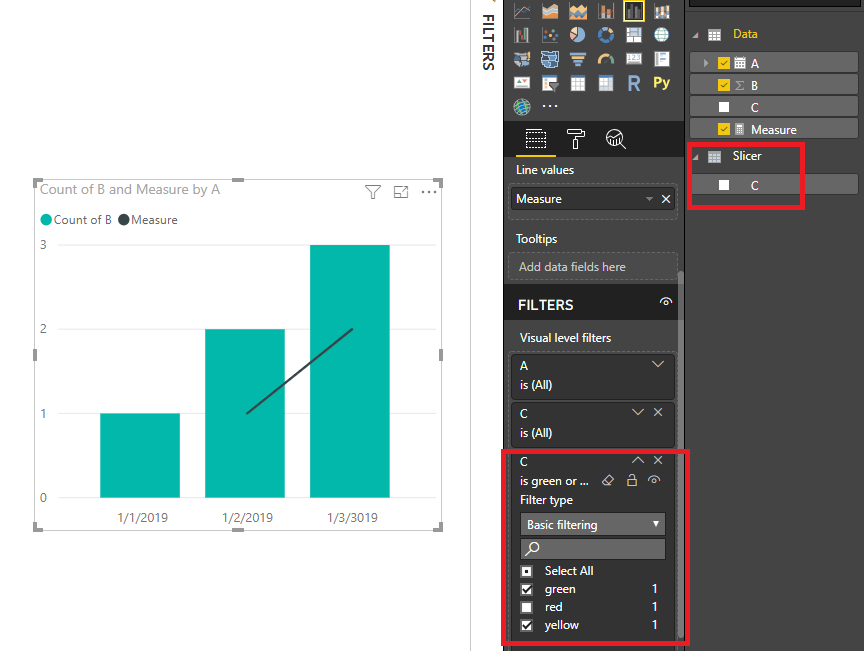
You may create a slicer table: Slicer = DISTINCT(Data[C]).Make sure there's no relationship between them.Then you may create a dynamic measure for C. Drag the Slicer table's column C to visual level filter or use it as slicer.Attached the sample file for your reference.
Measure =
CALCULATE (
COUNT ( Data[C] ),
FILTER ( Data, Data[C] IN VALUES ( 'Slicer'[C] ) )
)
Regards,
Cherie
Hi @Dauan
You may create a slicer table: Slicer = DISTINCT(Data[C]).Make sure there's no relationship between them.Then you may create a dynamic measure for C. Drag the Slicer table's column C to visual level filter or use it as slicer.Attached the sample file for your reference.
Measure =
CALCULATE (
COUNT ( Data[C] ),
FILTER ( Data, Data[C] IN VALUES ( 'Slicer'[C] ) )
)
Regards,
Cherie
The Power BI Data Visualization World Championships is back! Get ahead of the game and start preparing now!
| User | Count |
|---|---|
| 39 | |
| 37 | |
| 33 | |
| 32 | |
| 29 |
| User | Count |
|---|---|
| 132 | |
| 88 | |
| 82 | |
| 68 | |
| 64 |