cancel
Showing results for 
Search instead for 
Did you mean: 

The Power BI Data Visualization World Championships is back! Get ahead of the game and start preparing now! Learn more

Reply
Anonymous
Not applicable

Help controlling/limiting filter interactions between two visuals

I'm trying to enable filter behavior that I can't figure out for the life of me.

Importantly: I am looking for a solution that does not involve adding a new table to my data model.

My scenario is: 

  • I have a table with two dimensions (let's say product and segment) and a measure
  • I have another bar chart with just one of the dimensions (segment)

I would like to only pass the filter on Product from the table to the bar chart. If I disable the filtering on segment in the calculation, using ALL(), then I get the expected result of the same value for all segments. 

I'm also slightly confused why ALLEXCEPT() doesn't achieve my goal here, either. I would like to calculate the units for all rows, except those filtered by the product field, as:


CALCULATE( SUM( financials[Product] ), ALLEXCEPT( financials, financials[Product] ) )


Thanks for any help or insights you can provide.

Dashboard view: 

darrenfishell_0-1671554085378.png

Desired bar chart view when clicking any "Amarilla" product row in the table:
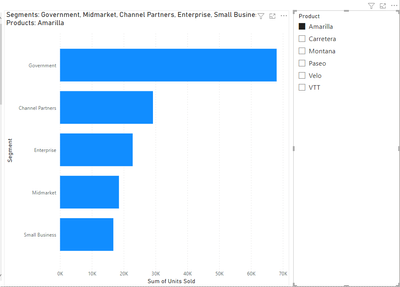
darrenfishell_1-1671554122735.png


2 REPLIES 2
bolfri
Solution Sage
Solution Sage

Can you share a pbix file with dummy data to see your table?


Did I answer your question? Mark my post as a solution!

Proud to be a Super User!


Anonymous
Not applicable

Thanks! I am unable to upload a file. For reference, the workbook and screenshots I posted use the sample dataset packaged with PowerBI -- from the `financials` table. 

Helpful resources

Announcements
Power BI DataViz World Championships

Power BI Dataviz World Championships

The Power BI Data Visualization World Championships is back! Get ahead of the game and start preparing now!

November Power BI Update Carousel

Power BI Monthly Update - November 2025

Check out the November 2025 Power BI update to learn about new features.

FabCon Atlanta 2026 carousel

FabCon Atlanta 2026

Join us at FabCon Atlanta, March 16-20, for the ultimate Fabric, Power BI, AI and SQL community-led event. Save $200 with code FABCOMM.