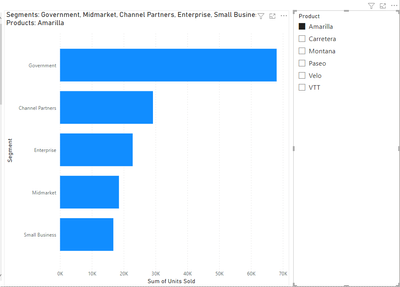
I'm trying to enable filter behavior that I can't figure out for the life of me.
Importantly: I am looking for a solution that does not involve adding a new table to my data model.
My scenario is:
- I have a table with two dimensions (let's say product and segment) and a measure
- I have another bar chart with just one of the dimensions (segment)
I would like to only pass the filter on Product from the table to the bar chart. If I disable the filtering on segment in the calculation, using ALL(), then I get the expected result of the same value for all segments.
I'm also slightly confused why ALLEXCEPT() doesn't achieve my goal here, either. I would like to calculate the units for all rows, except those filtered by the product field, as:
CALCULATE( SUM( financials[Product] ), ALLEXCEPT( financials, financials[Product] ) )
Thanks for any help or insights you can provide.
Dashboard view:

Desired bar chart view when clicking any "Amarilla" product row in the table: