cancel
Showing results for 
Search instead for 
Did you mean: 

We've captured the moments from FabCon & SQLCon that everyone is talking about, and we are bringing them to the community, live and on-demand. Starts on April 14th. Register now

Reply
Anonymous
Not applicable

Help With Table Relationships

Hi Guys,


I am hoping someone can help me with the Power BI relationship.  I have 5 tables:


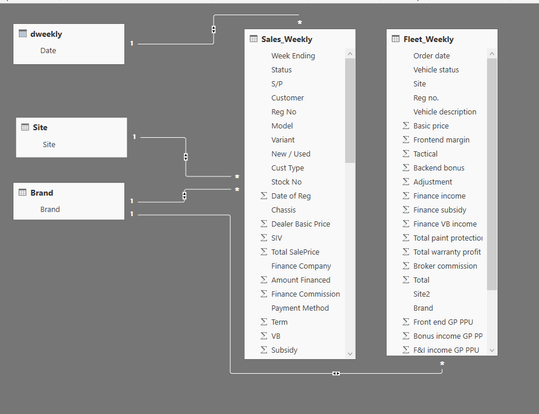
  1. dweekly – lookup table based on the dates from the Fleet_Weekly table
  2. Site – lookup table
  3. Brand – lookup table
  4. Sales_Weekly
  5. Fleet_weekly

See below

My relationships are as folows:

Dweekly table date = Sales Weekly Week Ending – Many to one and Both

Site table site = Sales Weekly Site - Many to one and Both

Brand table brand = Sales Weekly Brand - Many to one and Both

Brand table brand = Fleet Weekly Brand - Many to one and Both


POWER BI 1.png


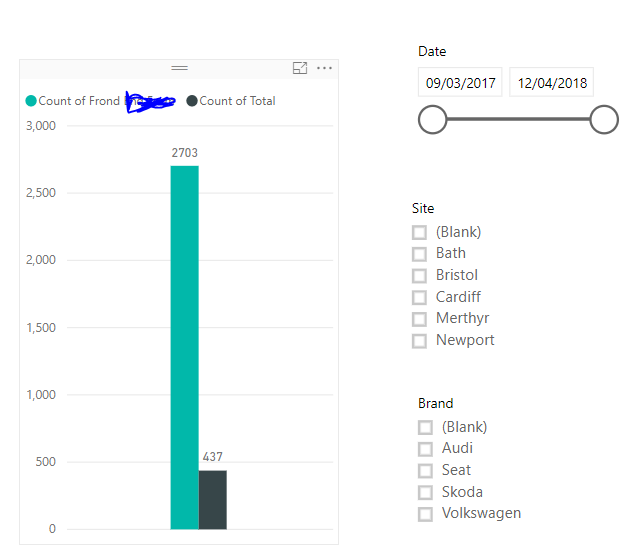
I now have a report which looks like the below:


POWER BI 2.png


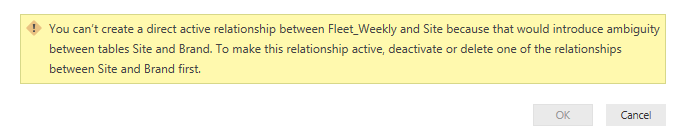
I can filter by Date and Brand and both sections in the graph will change accordingly which is great.  However, I also want to be able to filter by Site and for some reason I cannot get this to work properly.  If I try and create a relationship between the site table and site within the fleet weekly table, I get the following error message.  


POWER BI 3.png

Is there a way to be able to also filter by site?

Many thanks

1 ACCEPTED SOLUTION
v-xjiin-msft
Solution Sage
Solution Sage

Hi @Anonymous,


First you should know that in Power BI, you are only able to create one inactive relationship between two tables.


However since all the relationships you have set to Both Cross Filter Direction. It means there already exists an inactive relationship between Site and Brand. The path will be Site -> Sales Weekly -> Brand.


And now you want to create a new relationship between Site and Fleet Weekly, then a second relationship between Site and Brand will be generated as Site -> Fleet Weekly -> Brand. That's why the error occurs.


To resolve your issue, you can set the Cross Filter Direction to Single for the relationships " Site and Sales Weekly " and " Brand and Fleet Weekly ".


Thanks,
Xi Jin.

View solution in original post

1 REPLY 1
v-xjiin-msft
Solution Sage
Solution Sage

Hi @Anonymous,


First you should know that in Power BI, you are only able to create one inactive relationship between two tables.


However since all the relationships you have set to Both Cross Filter Direction. It means there already exists an inactive relationship between Site and Brand. The path will be Site -> Sales Weekly -> Brand.


And now you want to create a new relationship between Site and Fleet Weekly, then a second relationship between Site and Brand will be generated as Site -> Fleet Weekly -> Brand. That's why the error occurs.


To resolve your issue, you can set the Cross Filter Direction to Single for the relationships " Site and Sales Weekly " and " Brand and Fleet Weekly ".


Thanks,
Xi Jin.

Helpful resources

Announcements
New to Fabric survey Carousel

New to Fabric Survey

If you have recently started exploring Fabric, we'd love to hear how it's going. Your feedback can help with product improvements.

Power BI DataViz World Championships carousel

Power BI DataViz World Championships - June 2026

A new Power BI DataViz World Championship is coming this June! Don't miss out on submitting your entry.

Join our Fabric User Panel

Join our Fabric User Panel

Share feedback directly with Fabric product managers, participate in targeted research studies and influence the Fabric roadmap.

March Power BI Update Carousel

Power BI Community Update - March 2026

Check out the March 2026 Power BI update to learn about new features.