Hello -
I am having an issue with a data import and feel like I am missing something simple. Any help is appreciated.
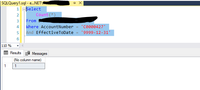
I am importing data using a SQL command (picture below).

The way this query is written with the Group By I should only have one row per account number.
When I Apply Changes, it tells me there is a duplicate value. If I create a table visual and do count of account number, I see two instances of the account number.

However, when I return to the PowerQuery editor and remove duplicates and filter by that account number, I only see one row

And when I execute the SQL query and limit to the account number in question, I get one row.
I have been working in PBI for over two years now and have never seen this issue. So what I am doing wrong here or what am I missing that is causing the particular value to show up as a duplicate? And it is it he only duplicate value in the table.
Any help is appreciated..
Matt


