cancel
Showing results for 
Search instead for 
Did you mean: 

Learn from the best! Meet the four finalists headed to the FINALS of the Power BI Dataviz World Championships! Register now

Reply
markefrody
Post Patron
Post Patron

Help With DAX for Nested IF Statements

Hi, 


I have this table:
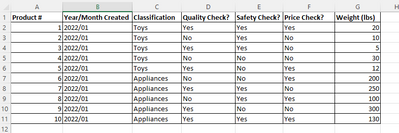
markefrody_1-1671132726317.png


For example I want to get the weight of the following items with the following conditions and add them to another item with a set of different conditions:

Weight for products classified as "Toys" which has "Quality check = Yes" and "Safety check = Yes" 

+

Weight for products classified as "Appliance" which has "Quality check = Yes" and "Price check = Yes" 

=

Grand total weight of the filtered conditions


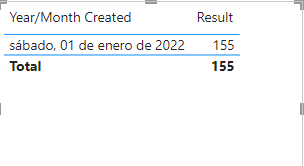
Would you be able to assist me to create a DAX based on the conditions above and be presented with an output similar to this?

markefrody_2-1671132848166.png

PS: I'm using Direct Query as storage mode.

Thanks and best regards,
Mark V.

1 ACCEPTED SOLUTION
Bifinity_75
Solution Sage
Solution Sage

Hi @markefrody , try this MEASURE:


Result = CALCULATE(sum(Table3[Weight (lbs)]),Table3[Classification]="Toys",Table3[Quality Check?]="Yes",Table3[Safety Check?]="Yes")+
CALCULATE(sum(Table3[Weight (lbs)]),Table3[Classification]="Appliances",Table3[Quality Check?]="Yes",Table3[Price Check?]="Yes")


The result:

Bifinity_75_0-1671222977478.png


Best Regards


View solution in original post

5 REPLIES 5
Bifinity_75
Solution Sage
Solution Sage

@markefrody , change the previous measure to this one:

Result = CALCULATE(sum('Table'[Weight (lbs)]),'Table'[Classification]="Toys",'Table'[Quality Check?]="Yes",'Table'[Safety Check?]="Yes")+
CALCULATE(sum('Table'[Weight (lbs)]),'Table'[Classification]="Appliances",'Table'[Quality Check?]="Yes",'Table'[Price Check?]="Yes")


Bifinity_75
Solution Sage
Solution Sage

Hi @markefrody , try this MEASURE:


Result = CALCULATE(sum(Table3[Weight (lbs)]),Table3[Classification]="Toys",Table3[Quality Check?]="Yes",Table3[Safety Check?]="Yes")+
CALCULATE(sum(Table3[Weight (lbs)]),Table3[Classification]="Appliances",Table3[Quality Check?]="Yes",Table3[Price Check?]="Yes")


The result:

Bifinity_75_0-1671222977478.png


Best Regards


@Bifinity_75. Thanks!

Bifinity_75
Solution Sage
Solution Sage

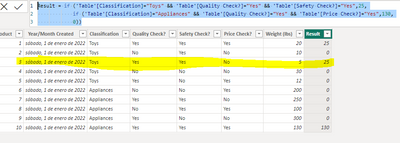
Hi @markefrody , try this calculate column:

Result = if ('Table'[Classification]="Toys" && 'Table'[Quality Check?]="Yes" && 'Table'[Safety Check?]="Yes",25,
            if ('Table'[Classification]="Appliances" && 'Table'[Quality Check?]="Yes" && 'Table'[Price Check?]="Yes",130,
            0))


The result:

Bifinity_75_0-1671138910610.png


Check your conditions for if statements.


Best regards


Hi @Bifinity_75 ,

Thank you for the response and assistance. I may have confused you with the conditional statements wherein I have mentioned the weight number. I have removed it, below is the corrected one:

Weight for products classified as "Toys" which has "Quality check = Yes" and "Safety check = Yes" 

+

Weight for products classified as "Appliance" which has "Quality check = Yes" and "Price check = Yes" 

=

Grand Total weight (lbs) of the filtered conditions


Helpful resources

Announcements
Join our Fabric User Panel

Join our Fabric User Panel

Share feedback directly with Fabric product managers, participate in targeted research studies and influence the Fabric roadmap.

February Power BI Update Carousel

Power BI Monthly Update - February 2026

Check out the February 2026 Power BI update to learn about new features.

FabCon Atlanta 2026 carousel

FabCon Atlanta 2026

Join us at FabCon Atlanta, March 16-20, for the ultimate Fabric, Power BI, AI and SQL community-led event. Save $200 with code FABCOMM.