

cancel
Showing results for 
Search instead for 
Did you mean: 

Learn from the best! Meet the four finalists headed to the FINALS of the Power BI Dataviz World Championships! Register now

Reply
jereaallikko
Helper III
Helper III

Help With Blank Values Follow-up

Hi all,


I need help with DAX or custom column. I am following mandatory fields that my team needs to fill. So, if some field is missing, a table shows blank value on a cell. 


Basically, I would like a card visual to show number of blank values in a whole dataset containing around 20 columns. 


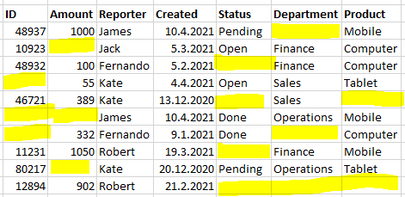
Sample data and table illustrated below:


jereaallikko_0-1619344578832.png


So, totally 15 cells are blank, and need to be filled. 

Additionally, I would like to create a visual that shows the number of blank values for each person.

Like:


James: 3

Jack: 1

Fernando: 3

Kate: 4

Robert: 4


Any suggestions how the problem could be solved? If more information is needed, don't hesitate to ask.


Thanks,

Jere Aallikko

1 ACCEPTED SOLUTION
v-xiaotang
Community Support
Community Support

Hi @jereaallikko 

You can take steps below for reference.

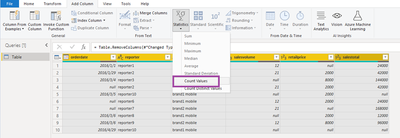
1. Go to Power Query Editor, you need to select all the columns, then

v-xiaotang_0-1619514438781.png

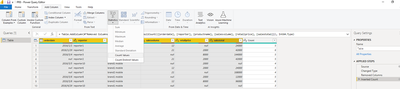
Get

v-xiaotang_1-1619514438796.png

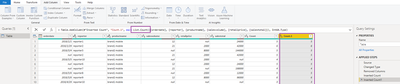
2. Repeat the operation, and replace “List.NonNullCount” with “List.Count”

v-xiaotang_2-1619514438806.png

v-xiaotang_3-1619514438814.png

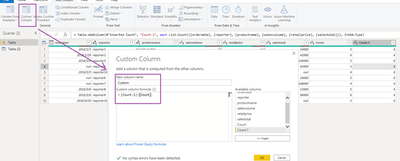
3. Add a custom column to get a diff, and change its type to Whole Number

v-xiaotang_4-1619514438822.png

4. Remove the two columns if you want

v-xiaotang_5-1619514438829.png

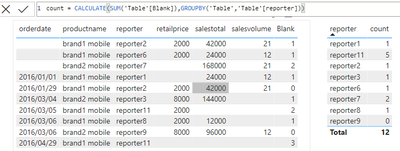
5. Create a measure

count = CALCULATE(SUM('Table'[Blank]),GROUPBY('Table','Table'[reporter]))

v-xiaotang_7-1619514644279.png

Hope it helps.


Best Regards,

Community Support Team _ Tang

If this post helps, please consider Accept it as the solution to help the other members find it more quickly.

View solution in original post

2 REPLIES 2
v-xiaotang
Community Support
Community Support

Hi @jereaallikko 

You can take steps below for reference.

1. Go to Power Query Editor, you need to select all the columns, then

v-xiaotang_0-1619514438781.png

Get

v-xiaotang_1-1619514438796.png

2. Repeat the operation, and replace “List.NonNullCount” with “List.Count”

v-xiaotang_2-1619514438806.png

v-xiaotang_3-1619514438814.png

3. Add a custom column to get a diff, and change its type to Whole Number

v-xiaotang_4-1619514438822.png

4. Remove the two columns if you want

v-xiaotang_5-1619514438829.png

5. Create a measure

count = CALCULATE(SUM('Table'[Blank]),GROUPBY('Table','Table'[reporter]))

v-xiaotang_7-1619514644279.png

Hope it helps.


Best Regards,

Community Support Team _ Tang

If this post helps, please consider Accept it as the solution to help the other members find it more quickly.

Fowmy
Super User
Super User

@jereaallikko 

You can add custom column using dax to the the table as follows:

Number of Blanks = 
COUNTROWS(
 FILTER( {TABLE02[ID], TABLE02[Amount], TABLE02[Created], TABLE02[Status], TABLE02[Department] , 
 TABLE02[Product]}, [Value] = BLANK() )
)


Insert a card visual and include the newly created column, Use a Table visual to include Reporter Name and the new column to show by name.

Did I answer your question? Mark my post as a solution! and hit thumbs up


Subscribe and learn Power BI from these videos

Website LinkedIn PBI User Group

Helpful resources

Announcements
Join our Fabric User Panel

Join our Fabric User Panel

Share feedback directly with Fabric product managers, participate in targeted research studies and influence the Fabric roadmap.

February Power BI Update Carousel

Power BI Monthly Update - February 2026

Check out the February 2026 Power BI update to learn about new features.

FabCon Atlanta 2026 carousel

FabCon Atlanta 2026

Join us at FabCon Atlanta, March 16-20, for the ultimate Fabric, Power BI, AI and SQL community-led event. Save $200 with code FABCOMM.