Join us at FabCon Atlanta from March 16 - 20, 2026, for the ultimate Fabric, Power BI, AI and SQL community-led event. Save $200 with code FABCOMM.
Register now!Learn from the best! Meet the four finalists headed to the FINALS of the Power BI Dataviz World Championships! Register now
Sorry if the question title sounds confusing; I'm not really sure how to phrase it nicely. It's my first time doing this kind of work so due apologies if anything is phrased confusingly.
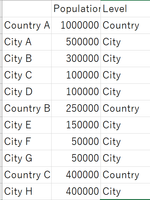
I have a table in PowerBI that combines both aggregated and individual data. An example dataset is as such:
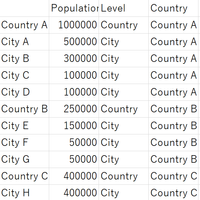
I'd like to add a column that references the country each City/Country belongs to, as such:
But I don't really know how to find the nearest earlier row that contains "Country" as the categorical value. Is there any way to do this in a calculated column via DAX?
On a separate note, I can split the tables up into a City and Country table, but because there are a lot of duplicates in the City Table I'd like to avoid that if possible.
Solved! Go to Solution.
This is the kind of data shaping to be done with M (Power Query), not with DAX.
In "Edit queries", add column "Country" with formula
if [CountryOrCity] = "Country" then [Location] else null
Next, go to the Tranform tab, make sure the new Country column is selected, and choose Fill - Fill Down.
This is the kind of data shaping to be done with M (Power Query), not with DAX.
In "Edit queries", add column "Country" with formula
if [CountryOrCity] = "Country" then [Location] else null
Next, go to the Tranform tab, make sure the new Country column is selected, and choose Fill - Fill Down.
Thanks for the help! I originally derived the Country/City column as a calculated column so doing it via Power Query wasn't intuitive to me but your answer brought me back to the right track.
On a separate note, does that also mean that there is no good way of doing this via a calculated column rather than via M?
In my view, it is not a good way to do it in DAX.
Then again, it might still be possible in DAX, but that's not my expertise, so I just don't know and I leave the answer to that question to the DAX experts over here.
Share feedback directly with Fabric product managers, participate in targeted research studies and influence the Fabric roadmap.
Check out the February 2026 Power BI update to learn about new features.
| User | Count |
|---|---|
| 60 | |
| 59 | |
| 41 | |
| 18 | |
| 15 |
| User | Count |
|---|---|
| 106 | |
| 106 | |
| 40 | |
| 29 | |
| 28 |