cancel
Showing results for 
Search instead for 
Did you mean: 

July 7 - July 17 | Round 2 of the Power BI Dataviz World Championships. Don't miss your chance! Learn more

Reply
ongzph
Frequent Visitor

Help: Using earlier row values as condition

Sorry if the question title sounds confusing; I'm not really sure how to phrase it nicely. It's my first time doing this kind of work so due apologies if anything is phrased confusingly.


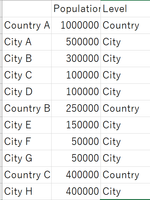
I have a table in PowerBI that combines both aggregated and individual data. An example dataset is as such:

Capture.PNG


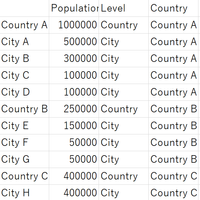
I'd like to add a column that references the country each City/Country belongs to, as such:

Capture2.PNG


But I don't really know how to find the nearest earlier row that contains "Country" as the categorical value. Is there any way to do this in a calculated column via DAX?


On a separate note, I can split the tables up into a City and Country table, but because there are a lot of duplicates in the City Table I'd like to avoid that if possible.

1 ACCEPTED SOLUTION
MarcelBeug
Community Champion
Community Champion

This is the kind of data shaping to be done with M (Power Query), not with DAX.

In "Edit queries", add column "Country" with formula


if [CountryOrCity] = "Country" then [Location] else null


Next, go to the Tranform tab, make sure the new Country column is selected, and choose Fill - Fill Down.

Specializing in Power Query Formula Language (M)

View solution in original post

3 REPLIES 3
MarcelBeug
Community Champion
Community Champion

This is the kind of data shaping to be done with M (Power Query), not with DAX.

In "Edit queries", add column "Country" with formula


if [CountryOrCity] = "Country" then [Location] else null


Next, go to the Tranform tab, make sure the new Country column is selected, and choose Fill - Fill Down.

Specializing in Power Query Formula Language (M)

Thanks for the help! I originally derived the Country/City column as a calculated column so doing it via Power Query wasn't intuitive to me but your answer brought me back to the right track.


On a separate note, does that also mean that there is no good way of doing this via a calculated column rather than via M?

In my view, it is not a good way to do it in DAX.

Then again, it might still be possible in DAX, but that's not my expertise, so I just don't know and I leave the answer to that question to the DAX experts over here.

Specializing in Power Query Formula Language (M)

Helpful resources

Announcements
FabCon and SQLCon Barcelona 2026

FabCon & SQLCon – Barcelona 2026

Join us in Barcelona for FabCon and SQLCon, the Fabric, Power BI, SQL, and AI community event. Save €200 with code FABCMTY200.

60 days of Data Days Carousel

Data Days 2026

Join Fabric Data Days 2026: 60 days of free live/on-demand sessions, challenges, study groups, and certification opportunities.

Power BI DataViz World Championships carousel

Power BI DataViz World Championships - June 2026

A new Power BI DataViz World Championship is coming this June! Don't miss out on submitting your entry.