cancel
Showing results for 
Search instead for 
Did you mean: 

July 7 - July 17 | Round 2 of the Power BI Dataviz World Championships. Don't miss your chance! Learn more

Reply
Anonymous
Not applicable

Help: Personalized visual does not work

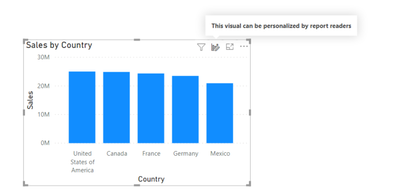
I have used personalized visual previously but this morning it suddently stop working. When I clicked the icon it shows "This visual can be personalized by report readers" but it does not activate personalization pop-up window. I have select the "Personalize visuals" option under File --> Options--> Report settings. What could be wrong? Thanks!


snowflake123_0-1612456658806.png


1 ACCEPTED SOLUTION
Anonymous
Not applicable

Hi @Anonymous ,


Please try to upgrade Power BI Desktop to the latest version.


Here are some restrictions about personalize visuals, you can check them one by one:

  • This feature isn't supported for publish to web.
  • User explorations don't automatically persist. You need to save your view as a personal bookmark to capture your changes.
  • This feature is supported in the Power BI mobile apps for iOS and Android tablets and in the Power BI Windows app; it is not supported in the Power BI mobile apps for phones. However, any change to a visual you save in a personal bookmark while in the Power BI service is respected in all the Power BI mobile apps.
  • Personalize this visual can be turned off for an entire report or for a particular visual. If you don't have an option to personalize a visual, check with your Power BI admin or the report owner. To display contact information for the report owner, select the name of the report from the Power BI menu bar.
  • User explorations don't automatically persist. You need to save your view as a personal bookmark to capture your changes.
  • This feature is supported in the Power BI mobile apps for iOS and Android tablets and in the Power BI Windows app; it is not supported in the Power BI mobile apps for phones. However, any change to a visual you save in a personal bookmark while in the Power BI service is respected in all the Power BI mobile apps.


Best Regards,

Stephen Tao


If this post helps, then please consider Accept it as the solution to help the other members find it more quickly.

View solution in original post

1 REPLY 1
Anonymous
Not applicable

Hi @Anonymous ,


Please try to upgrade Power BI Desktop to the latest version.


Here are some restrictions about personalize visuals, you can check them one by one:

  • This feature isn't supported for publish to web.
  • User explorations don't automatically persist. You need to save your view as a personal bookmark to capture your changes.
  • This feature is supported in the Power BI mobile apps for iOS and Android tablets and in the Power BI Windows app; it is not supported in the Power BI mobile apps for phones. However, any change to a visual you save in a personal bookmark while in the Power BI service is respected in all the Power BI mobile apps.
  • Personalize this visual can be turned off for an entire report or for a particular visual. If you don't have an option to personalize a visual, check with your Power BI admin or the report owner. To display contact information for the report owner, select the name of the report from the Power BI menu bar.
  • User explorations don't automatically persist. You need to save your view as a personal bookmark to capture your changes.
  • This feature is supported in the Power BI mobile apps for iOS and Android tablets and in the Power BI Windows app; it is not supported in the Power BI mobile apps for phones. However, any change to a visual you save in a personal bookmark while in the Power BI service is respected in all the Power BI mobile apps.


Best Regards,

Stephen Tao


If this post helps, then please consider Accept it as the solution to help the other members find it more quickly.

Helpful resources

Announcements
FabCon and SQLCon Barcelona 2026

FabCon & SQLCon – Barcelona 2026

Join us in Barcelona for FabCon and SQLCon, the Fabric, Power BI, SQL, and AI community event. Save €200 with code FABCMTY200.

60 days of Data Days Carousel

Data Days 2026

Join Fabric Data Days 2026: 60 days of free live/on-demand sessions, challenges, study groups, and certification opportunities.

Power BI DataViz World Championships carousel

Power BI DataViz World Championships - June 2026

A new Power BI DataViz World Championship is coming this June! Don't miss out on submitting your entry.