Don't miss your chance to take the Fabric Data Engineer (DP-700) exam on us!
Learn moreWe've captured the moments from FabCon & SQLCon that everyone is talking about, and we are bringing them to the community, live and on-demand. Starts on April 14th. Register now
Hi,
I have a very simple code in calculated cloumns where I am using lookup value to get required information from another table.
=LOOKUPVALUE('Knock off details for AP'[Document No.],'Knock off details for AP'[Vendor Ledger Entry No.],'Vendor Ledger Entries'[Entry No.],'Knock off details for AP'[Entry Type],"Application")
It is giving me the following error: Calculation error in column 'Vendor Ledger Entries'[]: A table of multiple values was supplied where a single value was expected.
I have manually checked and if done right above syntax should give only 1 result. Can someone please guide where I'm getting the code wrong.
Regards,
Mueez
Solved! Go to Solution.
Hi @Mueez ,
I give an sample.
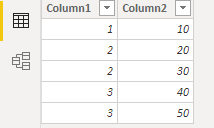
I have two tables like this.
--Table
--Table(2)
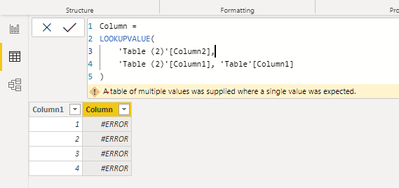
Then I create a calculated column in 'Table'.
The cause of the error is this, Table(2) has two values that are not aggregated.
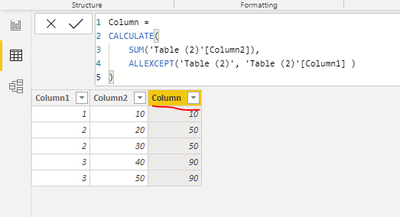
You can do like this.
1. Create a calculated column in 'Table(2)'
2. LOOKUPVALUE()
Best regards,
Lionel Chen
If this post helps, then please consider Accept it as the solution to help the other members find it more quickly.
Hi @Mueez ,
I give an sample.
I have two tables like this.
--Table
--Table(2)
Then I create a calculated column in 'Table'.
The cause of the error is this, Table(2) has two values that are not aggregated.
You can do like this.
1. Create a calculated column in 'Table(2)'
2. LOOKUPVALUE()
Best regards,
Lionel Chen
If this post helps, then please consider Accept it as the solution to help the other members find it more quickly.
Thank you so much!
Much Thanks!
Regards,
Mueez
@Mueez
For the criteria you provided in the LOOKUPVALUE function, there could be more than one value returned from
⭕ Subscribe and learn Power BI from these videos
⚪ Website ⚪ LinkedIn ⚪ PBI User Group
@Fowmy Thanks for replying
I am pretty sure there are no duplicates because when I change code as following I stop getting error.
= LOOKUPVALUE ('Cancellation details for AP' [Document No.], 'Knock off details for AP' [Vendor Ledger Entry No.], <hard code entry number>, 'Knock off details for AP' [ Entry Type], "Application" )
But this is obvioulsy not what I want. The formula needs to iterate through each line in of the table.
Best Regards,
Mueez
@Mueez
A column cannot contain two Document Numbers. That is not the right way. But, you can still do it using CONCATNATEX and FILTER functions
________________________
If my answer was helpful, please consider Accept it as the solution to help the other members find it
Click on the Thumbs-Up icon if you like this reply 🙂
⭕ Subscribe and learn Power BI from these videos
⚪ Website ⚪ LinkedIn ⚪ PBI User Group
If you have recently started exploring Fabric, we'd love to hear how it's going. Your feedback can help with product improvements.
A new Power BI DataViz World Championship is coming this June! Don't miss out on submitting your entry.
Share feedback directly with Fabric product managers, participate in targeted research studies and influence the Fabric roadmap.
| User | Count |
|---|---|
| 56 | |
| 40 | |
| 36 | |
| 20 | |
| 18 |
| User | Count |
|---|---|
| 73 | |
| 73 | |
| 38 | |
| 35 | |
| 26 |