Get certified for free when you join Fabric Data Days 2026 and dive into Fabric, Power BI, SQL, AI, and other essential data skills.
Join nowTry your skills in the Power BI Dataviz World Championship! Round one ends June 26. Join now
I have a data set that is set up so that one column contains one of the following: Gallons, Revenue, Fees, Discount and another column next to it that contains the value.
I would like to divide all of them by gallons except gallons. I don't want to unpivot my data and am looking for a way to do this either by calculated column or measure.
So I want to take total revenue and divide by total gallons and total fees and divid by total gallons, on an on:
| Type | Amount |
| GALLONS | 50 |
| REVENUE | 200 |
| FEES | 25 |
| DISCOUNT | 0.25 |
| GALLONS | 50 |
| REVENUE | 200 |
| FEES | 25 |
| DISCOUNT | 0.25 |
Solved! Go to Solution.
Hi @hstgeorge
Here's a sample PBIX with data and DAX Code
Try this measure
Ratio = DIVIDE( SUM('Table'[Amount]), CALCULATE( SUM('Table'[Amount]), FILTER(ALL('Table'), 'Table'[Type] = "GALLONS")))
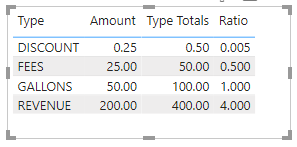
You should get this
Regards
Phil
Proud to be a Super User!
Hi @hstgeorge
Here's a sample PBIX with data and DAX Code
Try this measure
Ratio = DIVIDE( SUM('Table'[Amount]), CALCULATE( SUM('Table'[Amount]), FILTER(ALL('Table'), 'Table'[Type] = "GALLONS")))
You should get this
Regards
Phil
Proud to be a Super User!
Hello @hstgeorge
Can you please share the expected output as the description is not very clear?
@hstgeorge , Create a measure like
divide(calculate(sum(Table[Amount]), filter(Table, Table[Type] ="GALLONS")),calculate(sum(Table[Amount]), filter(Table, Table[Type] <>"GALLONS")))
When I type that calc and then use line items in the row to show revenue and then put in the measure so it should divide revenue by gallons, it shows zero or blank but has a value in the total. Any other suggestions
| User | Count |
|---|---|
| 23 | |
| 19 | |
| 19 | |
| 17 | |
| 11 |
| User | Count |
|---|---|
| 57 | |
| 55 | |
| 41 | |
| 40 | |
| 30 |