Join us at FabCon Atlanta from March 16 - 20, 2026, for the ultimate Fabric, Power BI, AI and SQL community-led event. Save $200 with code FABCOMM.
Register now!The Power BI Data Visualization World Championships is back! Get ahead of the game and start preparing now! Learn more
Hello Everyone,
I only have the cumulative value. I need to get the total amount.
Can anybody help me inverse the cumulative amount, please??
Year Month Cumulative Total
| 2017 | January | 18 | 18 |
| 2017 | February | 28 | |
| 2017 | March | 52 | |
| 2017 | April | 68 | |
| 2017 | May | 105 | |
| 2017 | June | 137 | |
| 2017 | July | 166 | |
| 2017 | August | 192 | |
| 2017 | September | 214 | |
| 2017 | October | 242 | |
| 2017 | November | 280 | |
| 2017 | December | 313 | |
| 2018 | January | 29 | 29 |
| 2018 | February | 52 | |
| 2018 | March | 72 | |
| 2018 | April | 91 | |
| 2018 | May | 115 | |
| 2018 | June | 137 | |
| 2018 | July | 171 | |
| 2018 | August | 205 | |
| 2018 | September | 252 | |
| 2018 | October | 334 | |
| 2018 | November | 381 | |
| 2018 | December | 419 |
Solved! Go to Solution.
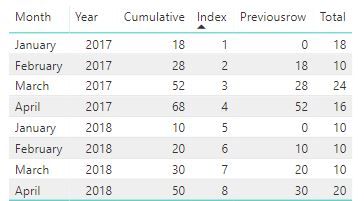
Ok, than add an if statement in the calculated column to start over in january:
Previousrow =
VAR previousrow = CALCULATE(
SUM(Table1[Cumulative]);
FILTER(Table1;Table1[Index]=EARLIER(Table1[Index])-1)
)
RETURN
IF(Table1[Month]="January";0;previousrow)This might not be the best solution, but you could (with misspellings):
1. Create an index column in Power Query 1,2,3 etc.
2. Create a calculated column with the previous row:
Previousrow =
VAR previousrow = CALCULATE(
SUM(Table1[Cumulative]);
FILTER(Table1;Table1[Index]=EARLIER(Table1[Index])-1)
)
RETURN
previousrow3. Create a measure that takes
Total = SUM(Table1[Cumulative])-SUM(Table1[Previousrow])
Thank you for your solution however in my case, the cumulative always starts in January.
Ok, than add an if statement in the calculated column to start over in january:
Previousrow =
VAR previousrow = CALCULATE(
SUM(Table1[Cumulative]);
FILTER(Table1;Table1[Index]=EARLIER(Table1[Index])-1)
)
RETURN
IF(Table1[Month]="January";0;previousrow)Thank you for your help! You are amazing!
The Power BI Data Visualization World Championships is back! Get ahead of the game and start preparing now!
| User | Count |
|---|---|
| 38 | |
| 35 | |
| 33 | |
| 32 | |
| 29 |
| User | Count |
|---|---|
| 134 | |
| 96 | |
| 78 | |
| 67 | |
| 65 |