Join us at FabCon Atlanta from March 16 - 20, 2026, for the ultimate Fabric, Power BI, AI and SQL community-led event. Save $200 with code FABCOMM.
Register now!The Power BI Data Visualization World Championships is back! It's time to submit your entry. Live now!
Hello Everyone,
I only have the cumulative value. I need to get the total amount.
Can anybody help me inverse the cumulative amount, please??
Year Month Cumulative Total
| 2017 | January | 18 | 18 |
| 2017 | February | 28 | |
| 2017 | March | 52 | |
| 2017 | April | 68 | |
| 2017 | May | 105 | |
| 2017 | June | 137 | |
| 2017 | July | 166 | |
| 2017 | August | 192 | |
| 2017 | September | 214 | |
| 2017 | October | 242 | |
| 2017 | November | 280 | |
| 2017 | December | 313 | |
| 2018 | January | 29 | 29 |
| 2018 | February | 52 | |
| 2018 | March | 72 | |
| 2018 | April | 91 | |
| 2018 | May | 115 | |
| 2018 | June | 137 | |
| 2018 | July | 171 | |
| 2018 | August | 205 | |
| 2018 | September | 252 | |
| 2018 | October | 334 | |
| 2018 | November | 381 | |
| 2018 | December | 419 |
Solved! Go to Solution.
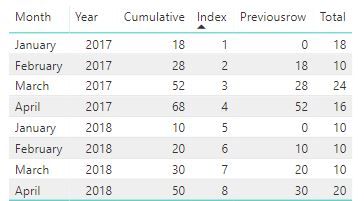
Ok, than add an if statement in the calculated column to start over in january:
Previousrow =
VAR previousrow = CALCULATE(
SUM(Table1[Cumulative]);
FILTER(Table1;Table1[Index]=EARLIER(Table1[Index])-1)
)
RETURN
IF(Table1[Month]="January";0;previousrow)This might not be the best solution, but you could (with misspellings):
1. Create an index column in Power Query 1,2,3 etc.
2. Create a calculated column with the previous row:
Previousrow =
VAR previousrow = CALCULATE(
SUM(Table1[Cumulative]);
FILTER(Table1;Table1[Index]=EARLIER(Table1[Index])-1)
)
RETURN
previousrow3. Create a measure that takes
Total = SUM(Table1[Cumulative])-SUM(Table1[Previousrow])
Thank you for your solution however in my case, the cumulative always starts in January.
Ok, than add an if statement in the calculated column to start over in january:
Previousrow =
VAR previousrow = CALCULATE(
SUM(Table1[Cumulative]);
FILTER(Table1;Table1[Index]=EARLIER(Table1[Index])-1)
)
RETURN
IF(Table1[Month]="January";0;previousrow)Thank you for your help! You are amazing!
The Power BI Data Visualization World Championships is back! It's time to submit your entry.
Check out the January 2026 Power BI update to learn about new features.
| User | Count |
|---|---|
| 67 | |
| 44 | |
| 34 | |
| 27 | |
| 23 |
| User | Count |
|---|---|
| 137 | |
| 118 | |
| 58 | |
| 40 | |
| 35 |