Join us at FabCon Atlanta from March 16 - 20, 2026, for the ultimate Fabric, Power BI, AI and SQL community-led event. Save $200 with code FABCOMM.
Register now!The Power BI Data Visualization World Championships is back! Get ahead of the game and start preparing now! Learn more
Dear Techie,
I have two fact tables (Census & Events) and they are connected to a common dimensions like Patient, Date. I want to create a measure that will give the date difference between Admission date (Census Fact) and Event date (Event Fact) in days.
Relationships:
Census Date
Census Date*:1 Date
Event Date
Event Date*:1 Date
Census Patient
PatientKey PatientKey
Event Patient
PatientKey PatientKey
Example:
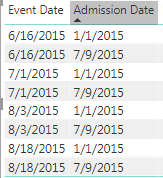
When I add Event Date and Admission Date for a particular patient, this is how the report looks. I want to add a measure next to this that should give the difference in days
I have tried many options but none is working. Can anyone please help me on this?
Thanks,
Latheesh
@latheesh89 read this post to get your answer quickly
https://community.powerbi.com/t5/Community-Blog/How-to-Get-Your-Question-Answered-Quickly/ba-p/38490
Subscribe to the @PowerBIHowTo YT channel for an upcoming video on List and Record functions in Power Query!!
Learn Power BI and Fabric - subscribe to our YT channel - Click here: @PowerBIHowTo
If my solution proved useful, I'd be delighted to receive Kudos. When you put effort into asking a question, it's equally thoughtful to acknowledge and give Kudos to the individual who helped you solve the problem. It's a small gesture that shows appreciation and encouragement! ❤
Did I answer your question? Mark my post as a solution. Proud to be a Super User! Appreciate your Kudos 🙂
Feel free to email me with any of your BI needs.
@parry2k As suggested, I have added the details. Please let me know if you required anymore details.
@latheesh89 so you are looking for difference between event date and admission date?
add a new columna as below
# of Days = DATEDIFF( Table[Admission Date], Table[Event Date], DAY )
Subscribe to the @PowerBIHowTo YT channel for an upcoming video on List and Record functions in Power Query!!
Learn Power BI and Fabric - subscribe to our YT channel - Click here: @PowerBIHowTo
If my solution proved useful, I'd be delighted to receive Kudos. When you put effort into asking a question, it's equally thoughtful to acknowledge and give Kudos to the individual who helped you solve the problem. It's a small gesture that shows appreciation and encouragement! ❤
Did I answer your question? Mark my post as a solution. Proud to be a Super User! Appreciate your Kudos 🙂
Feel free to email me with any of your BI needs.
The Power BI Data Visualization World Championships is back! Get ahead of the game and start preparing now!
Check out the November 2025 Power BI update to learn about new features.
| User | Count |
|---|---|
| 59 | |
| 46 | |
| 42 | |
| 23 | |
| 18 |
| User | Count |
|---|---|
| 193 | |
| 123 | |
| 99 | |
| 67 | |
| 49 |