cancel
Showing results for 
Search instead for 
Did you mean: 

July 7 - July 17 | Round 2 of the Power BI Dataviz World Championships. Don't miss your chance! Learn more

Reply
mahendrapal1792
Regular Visitor

Hello Community DAX function.

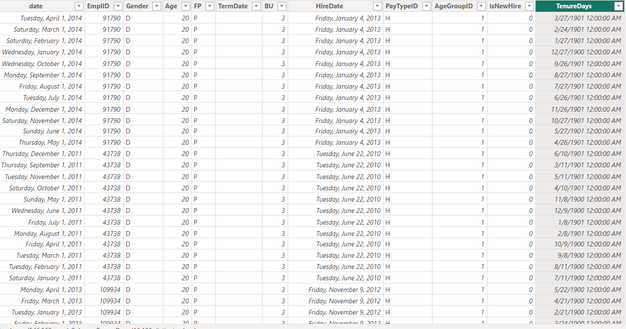
I am sharing the table screenshot where there are column name date and hire date so I am trying to get the tenure day through that but I am not able to understand the logic of the calculated Dax formula for this, I am sharing the formula can someone explain me this that how this logic work     

TenureDays = IF([date]-[HireDate]<0,[HireDate]-[date],[date]-[HireDate])
I used this formula but i don't get the logic behind of it

mahendrapal1792_0-1702997544195.png


2 ACCEPTED SOLUTIONS
smpa01
Community Champion
Community Champion

@mahendrapal1792  can you try this

Tenure Days = CONVERT(IF([date]-[HireDate]<0,[HireDate]-[date],[date]-[HireDate]),INTEGER)

========================
Did I answer your question? Mark my post as a solution!
Proud to be a Super User
My Custom Visualization Projects
• Plotting Live Sound: Live Sound
• Beautiful News: Women in Parliament, Energy Mix, Shrinking Armies
• Visual Capitalist: Working Hrs
• Others: Easing Graph, Animated Calendar
MayViz Submissions
• Week 1: View
• Week 2: View
• Week 3: View
• Week 4: View
========================

View solution in original post

Anonymous
Not applicable

Hi @mahendrapal1792 


smpa01’s answer is correct , Since your original formula subtracts two dates and returns a date type, you need to use the convert function to make it an integer type.


There is another method you can use to get the same result.


You can use the DATEDUFF function, this function returns the number of units (unit specified in Interval) between the input two dates.


The formula is as follows


TenureDays = DATEDIFF([data],[HireData],DAY)


Best Regards,

Jayleny

View solution in original post

3 REPLIES 3
Anonymous
Not applicable

Hi @mahendrapal1792 


smpa01’s answer is correct , Since your original formula subtracts two dates and returns a date type, you need to use the convert function to make it an integer type.


There is another method you can use to get the same result.


You can use the DATEDUFF function, this function returns the number of units (unit specified in Interval) between the input two dates.


The formula is as follows


TenureDays = DATEDIFF([data],[HireData],DAY)


Best Regards,

Jayleny

smpa01
Community Champion
Community Champion

@mahendrapal1792  can you try this

Tenure Days = CONVERT(IF([date]-[HireDate]<0,[HireDate]-[date],[date]-[HireDate]),INTEGER)

========================
Did I answer your question? Mark my post as a solution!
Proud to be a Super User
My Custom Visualization Projects
• Plotting Live Sound: Live Sound
• Beautiful News: Women in Parliament, Energy Mix, Shrinking Armies
• Visual Capitalist: Working Hrs
• Others: Easing Graph, Animated Calendar
MayViz Submissions
• Week 1: View
• Week 2: View
• Week 3: View
• Week 4: View
========================

Can you explain how this formula works?


Helpful resources

Announcements
FabCon and SQLCon Barcelona 2026

FabCon & SQLCon – Barcelona 2026

Join us in Barcelona for FabCon and SQLCon, the Fabric, Power BI, SQL, and AI community event. Save €200 with code FABCMTY200.

60 days of Data Days Carousel

Data Days 2026

Join Data Days 2026: 60 days of free live/on-demand sessions, challenges, study groups, and certification opportunities.

Power BI DataViz World Championships carousel

Power BI DataViz World Championships - June 2026

A new Power BI DataViz World Championship is coming this June! Don't miss out on submitting your entry.

Top Solution Authors