This time we’re going bigger than ever. Fabric, Power BI, SQL, AI and more. We're covering it all. You won't want to miss it.
Learn moreDid you hear? There's a new SQL AI Developer certification (DP-800). Start preparing now and be one of the first to get certified. Register now
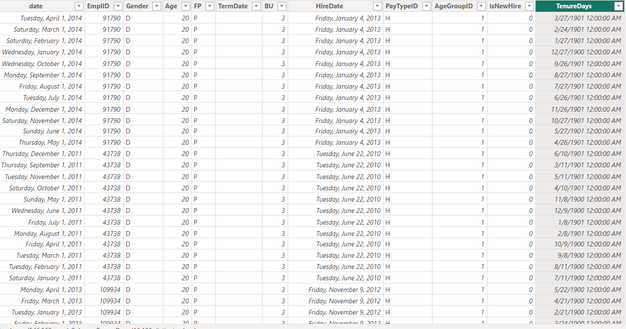
I am sharing the table screenshot where there are column name date and hire date so I am trying to get the tenure day through that but I am not able to understand the logic of the calculated Dax formula for this, I am sharing the formula can someone explain me this that how this logic work
Solved! Go to Solution.
@mahendrapal1792 can you try this
Tenure Days = CONVERT(IF([date]-[HireDate]<0,[HireDate]-[date],[date]-[HireDate]),INTEGER)
smpa01’s answer is correct , Since your original formula subtracts two dates and returns a date type, you need to use the convert function to make it an integer type.
There is another method you can use to get the same result.
You can use the DATEDUFF function, this function returns the number of units (unit specified in Interval) between the input two dates.
The formula is as follows
TenureDays = DATEDIFF([data],[HireData],DAY)
Best Regards,
Jayleny
smpa01’s answer is correct , Since your original formula subtracts two dates and returns a date type, you need to use the convert function to make it an integer type.
There is another method you can use to get the same result.
You can use the DATEDUFF function, this function returns the number of units (unit specified in Interval) between the input two dates.
The formula is as follows
TenureDays = DATEDIFF([data],[HireData],DAY)
Best Regards,
Jayleny
@mahendrapal1792 can you try this
Tenure Days = CONVERT(IF([date]-[HireDate]<0,[HireDate]-[date],[date]-[HireDate]),INTEGER)
Can you explain how this formula works?
Check out the April 2026 Power BI update to learn about new features.
Sign up to receive a private message when registration opens and key events begin.
If you have recently started exploring Fabric, we'd love to hear how it's going. Your feedback can help with product improvements.
| User | Count |
|---|---|
| 34 | |
| 31 | |
| 30 | |
| 21 | |
| 16 |
| User | Count |
|---|---|
| 63 | |
| 53 | |
| 31 | |
| 23 | |
| 23 |