cancel
Showing results for 
Search instead for 
Did you mean: 

July 7 - July 17 | Round 2 of the Power BI Dataviz World Championships. Don't miss your chance! Learn more

Reply
ToddFScholes
Regular Visitor

HANA Query Timeout Issue

Hi,


I have established a source connection to a HANA database, using "Import" connectivity type and specifying a simple SQL statement to read data from a specific table.   The correct table and contents are displayed (in preview), however when I then press the "Load" button I get the following timeout error.


TimeoutError1.PNG


The message "There are pending changes in your queries that haven't been applied" appears at the top of the screen.  If I press "Apply Changes" then it attempts to re-process however the same timeout error occurs.


If this is an actual timeout error, is there a way I can extend the timeout value?  ...or does it point to an actual connection error somewhere?  Note that if I go into "Edit Queries" I can see the query and the correct data shown, ready to load...


Thanks very much for your help!

Todd


3 REPLIES 3
RafalK
Advocate IV
Advocate IV

I am facing similar problem.

I see the data in query editor but I can't run the report, even if the query returns just one row of data.


Any updates on this topic?


Regards

Rafał Kun
v-huizhn-msft
Microsoft Employee
Microsoft Employee

Hi @ToddFScholes,

You can connect the HAHA database successfully? After research, I find a similar thread, please review it.  The connection creation interface wasn't very specific about the need to include a port.  Did you add the port when prompted for the "server" express it like this:  <servername>.<domain>.<com/net>:<port>?

If you have not, please add the port number and check if it works fine.

Best Regards,
Angelia

Hi Angelia,


Thanks for your response.  Yes, I have specified the port, and I am able to connect to the database.


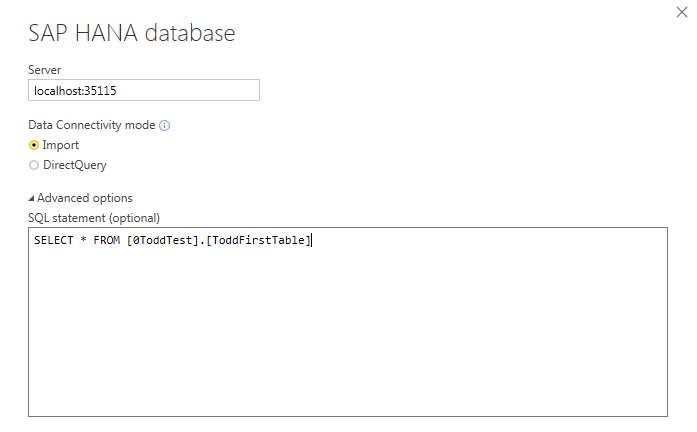
My HANA database is running on my trial SAP Cloud Platform account, and I am connecting to it via SAP Cloud Connector which is running on my laptop.  So the server entry I specify is "localhost:35115".


Connection STring.PNG


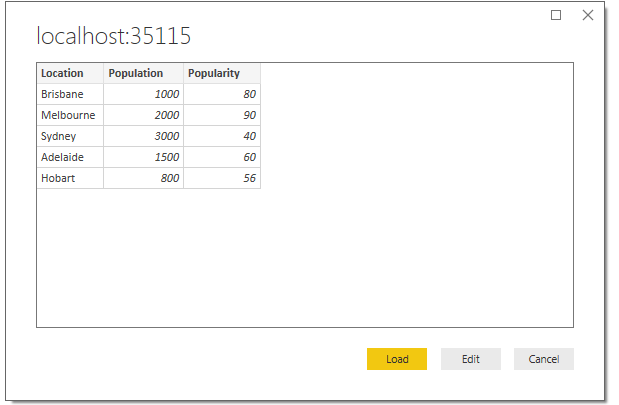
When I select "connect" from this screen, the next screen I am shown is my table with the data - so it's obviously able to talk to the database ok!


Shows data.PNG


It's when I then press "Load", that I get the error shown in my previous post.  Is there anywhere that might display some logs to help understand the issue?  Or can I increase the timeout value?


Thanks for your help.

Todd


Helpful resources

Announcements
FabCon and SQLCon Barcelona 2026

FabCon & SQLCon – Barcelona 2026

Join us in Barcelona for FabCon and SQLCon, the Fabric, Power BI, SQL, and AI community event. Save €200 with code FABCMTY200.

60 days of Data Days Carousel

Data Days 2026

Join Fabric Data Days 2026: 60 days of free live/on-demand sessions, challenges, study groups, and certification opportunities.

Power BI DataViz World Championships carousel

Power BI DataViz World Championships - June 2026

A new Power BI DataViz World Championship is coming this June! Don't miss out on submitting your entry.